

One of the golden rules of the AI era is to avoid paying for annual subscriptions to agent harnesses like Claude, Codex, and Cursor.
Not because they’re not worth it, but because things change so fast that you may want to switch between them rather than commit to one for a full year.
Just recently, Cursor, my coding harness of choice, changed its pricing plan. It will no longer offer third-party models at a discounted API rate. So, I’m leaning toward getting a Claude subscription alongside a cheaper version of Cursor, just to keep using it as my default coding harness.
If I make that change, I’ll have two paid harnesses, plus an open-source one: the Hermes Agent.
Why do I even need the Hermes Agent?
Well, first, it’s free. Second, I can do a lot of cool things with it that I can’t do with the others. And finally, I’m in full control of what I build and integrate. That’s the power of open source.
I could also go all-in with the Hermes Agent instead. In the end, it’s a matter of preference, and each harness has its own strengths and downsides.
In this article, we’re going to take a closer look at the Hermes Agent and four other open-source harnesses worth exploring.
By the end of this piece, you should have a good idea of which one you want to play with. You can be like me and manage multiple harnesses, or stick with one that does it all.
Why do you need an open-source agent harness in the first place?
The harness is everything that surrounds the Large Language Model (LLM) and the agent.
It includes the tools, memory layers, sandboxing, and other features that help the agent operate within certain guardrails and follow the user’s instructions.
A good harness should make the whole experience smooth without compromising your ability to build. It can also help you reduce costs.
We tend to focus on the price of the LLM, but when a harness is designed to work with specific models, you can actually get much more out of those models than you would with others.
That’s why two people using the same model can have very different experiences depending on the harness they use, and end up with very different bills.
So, next time, let’s not blame the model straight away. The problem could be the harness.
If you want to know more about agent harnesses and harness engineering, I wrote this article not too long ago:

Now it’s time to see the open-source solutions one by one!
1. OpenClaw: the lobster that made history
It was sometime in February this year that I first installed OpenClaw on my VPS.
Everyone was talking about it on X. Peter Steinberger, its creator, suddenly became incredibly popular and appeared on the Lex Fridman podcast. A few days later, he joined OpenAI.
I even wrote an article about this harness at that time:

Many people were already familiar with the concept of open-source AI harnesses, but OpenClaw took things to another level. It wasn’t just about coding anymore. People were using it to connect AI agents to WhatsApp, Telegram, Slack, and other platforms.
A whole ecosystem started to emerge around it. People wanted to build custom tools and skills, connect multiple messaging platforms, and route tasks between different models. OpenClaw quickly became one of the leading options for making all of this possible.
Stars: Around 392.7k on GitHub.
Latest version: v2026.10.5, released 18 Oct 2026. The last big release was OpenClaw 2.0 on 30 Aug 2026.
License and language: MIT, TypeScript.
Models: Works with hosted and local models. You can sign in with an existing ChatGPT or Claude subscription, use API keys, or run local models.
Setup: Easy to get started; medium difficulty to customize.
OpenClaw is the biggest project in this list by a wide margin. It was one of the first major projects to bring together a broad range of capabilities that went well beyond coding.
How it works
OpenClaw is all about the Gateway.
In practice, the gateway is the always-on process that routes messages between your chat apps, the AI model, and your tools. And skills, plugins, scheduled jobs, and MCP integrations can be added while the gateway is running.
More recently, OpenClaw has introduced shared cloud sessions, allowing teams to work with the same agent setup, along with cloud workers that can run coding tasks in separate environments. One option for managing these environments is Crabbox.
Setup
To install OpenClaw on your machine, run:
curl -fsSL https://openclaw.ai/install.sh | bashThis gets you started with the installer. You’ll still need to complete the onboarding process and configure your agent.
Check here for the full documentation.
What people are building
Here are a few examples of what people are doing with OpenClaw.
Making phone calls: You can use it to call a restaurant by combining tools like Twilio with a capable voice model. @vishnuunhsiv9, 3 Oct
Brainstorming ideas: You can have several OpenClaw agents talk to each other and come up with ideas to solve a problem. Multiple points of view can help you explore solutions you might otherwise miss. @kaushalvivek, 8 Sep
Building sales pipelines: You can create an outbound sales agent that combines web extraction, APIs, and CRM integrations to automate parts of your sales workflow. @jeffweisbein, 8 Oct
Companies are also using OpenClaw’s skills ecosystem (ClawHub) as a distribution channel. LinkBunny is one example, as highlighted by @hboon on X.
Strengths
One of the largest communities and most active release cycles among the projects in this comparison.
Support for more than 20 messaging platforms, along with mobile apps.
Flexible model and authentication options, potentially allowing you to use subscriptions or API access you already have, depending on provider support and terms.
Highly customizable, with a broad ecosystem of skills, plugins, and integrations.
Weaknesses
Some users report bugs and inconsistent agent behavior, including hallucinations.
Remote access and sandboxing require careful configuration. You shouldn’t assume they’re secure by default.
Limited independent benchmark coverage makes it difficult to compare its performance objectively with other harnesses.
Best for
Choose OpenClaw if you want to build custom AI agents that work across multiple platforms and connect to a wide range of APIs and MCP servers.
If you’re a developer, you can go even further and modify the core harness to better suit your needs. The large community and ClawHub’s extensive skills ecosystem also give you plenty of starting points for building your own workflows.
Just remember to review third-party skills before installing them, especially when they can execute code or access sensitive data.
2. DeepSeek Harness: everything is a plugin
DeepSeek Harness is a coding and general harness that passed 200,000 stars within two weeks of launch on GitHub.
Its slogan is “Everything Is a Plugin,” and they really mean it. The model adapter, tool registry, session log, sandboxes, UI, and even the agent loop itself can be replaced or extended through plugins.
Stars: Around 257k on GitHub.
Latest version: v0.2.1-rc.2, a release candidate published on 17 October 2026. The last big update was the v0.2 public preview in early October.
License and language: MIT, TypeScript.
Models: DeepSeek models, third-party providers, compatible endpoints, and local models, depending on the available plugins and configuration.
Setup: Easy to get started; customization takes more work.
The company behind it is DeepSeek, the Chinese AI lab known for its open-weight models and competitive model pricing.
What makes this project interesting is the ability to give developers a modular framework for building and experimenting with their own agents.
How it works
Under the hood, DeepSeek Harness runs on Cordis, a plugin framework whose design is described in an arXiv paper called A Programming Paradigm for Spatiotemporal Composability.
The idea is to turn the harness into a modular system where you can replace or extend individual components without having to rewrite everything else.
The main feature is Creator mode, where you can describe a plugin in chat, and the harness helps you create it and integrate it into your setup (remember, everything is a plugin).
Version 0.2 also introduced automation tasks for scheduled jobs.
Besides, you can also migrate parts of your Claude Code setup to DeepSeek Harness, including supported configuration files and hooks.
Setup
To install DeepSeek Harness, you first need Node.js on your machine. Then run:
npx @deepseek-ai/dsh webMac and Windows users can also explore the desktop version.
One thing to keep in mind: launching the command isn’t the same as updating an existing installation. If you already have it installed, check the project’s current upgrade instructions.
What people are building
Running local AI: You can connect DeepSeek Harness to local models through tools like Ollama. For example, @KgpTalkie shared a setup using a local Qwen model.
Creating custom plugins: Creator mode makes it possible to build small tools directly from a conversation. @petrusenko_max created a Pomodoro timer plugin, while @jauneclaude added Omarchy Radio.
These are good examples of what makes the project interesting. I guess we still need to wait a bit more to see how far people go with plugins.
Strengths
You can reconfigure almost every part of the harness, and Creator mode helps you build your own plugins.
It supports migration of selected Claude Code configurations, including files such as
AGENTS.mdandCLAUDE.md.You can use local models through integrations such as Ollama.
The modular architecture makes it a great project for developers who want to understand how agent harnesses work.
Weaknesses
The project is still in developer preview, and compatibility-breaking changes are possible.
Community reports have raised security concerns.
The desktop app may offer limited advantages over the web UI for some workflows.
Best for
Use this harness if you like to have an easy way to build around it, without having to do a lot of development work.
It’s particularly interesting if you want to experiment with custom plugins, local models, or different approaches to agent architecture without having to build an entire harness from scratch.
3. OpenCode: the best open-source coding harness
OpenCode, from Anomaly, is one of the most polished open-source coding harnesses out there. You can run it in your terminal, use the desktop app, or integrate it into your editor.
Stars: Around 219.6k on GitHub (as of 21 Oct 2026).
Latest version: OpenCode 2.0, announced on 12 Oct 2026. The newest 2.0 release is v2.0.32, from 16 Oct 2026.
License and language: MIT, TypeScript.
Models: more than 75 providers, including Anthropic, OpenAI, and local or self-hosted OpenAI-compatible servers. On top of that there’s OpenCode Zen, a curated pay-as-you-go model service, and OpenCode Go, an optional subscription at $10 or $40 a month.
Setup: Easy.
Unlike OpenClaw, OpenCode isn’t trying to do everything. It’s built specifically for coding. Think of it as a serious open-source alternative to paid coding harnesses.
How it works
OpenCode offers two main agents: one for building and another for planning.
The build agent can read and modify your code, while the plan agent is read-only and helps you explore a codebase, investigate problems, and figure out what to do before making changes.
Version 2.0 introduced a new architecture that allows OpenCode to run as a single background process shared by multiple interfaces, including the terminal UI, web app, and desktop app. This means agents and long-running tasks can keep working while you interact with them through different interfaces.
Another notable addition is Code Mode, which lets the agent access MCP servers and OpenAPI endpoints through JavaScript functions. Instead of loading every tool definition into the context upfront, the agent can call the functions it needs from a script, helping reduce context overhead.
The new version also brings background subagents, more than 80 internal plugins, hot-reloading for plugins, and an embeddable SDK.
In other words, OpenCode isn’t just a coding interface. It’s also a platform you can extend and integrate into your own development workflows.
Setup
Getting started is straightforward. Follow the instructions on the official OpenCode installation page.
There’s also a desktop app available for macOS, Linux, and Windows.
What people are building
OpenCode has an active plugin ecosystem, with many projects focused on managing costs and connecting different tools.
Creating plugins: Just like DeepSeek Harness, OpenCode lets you extend its functionality with custom plugins. For example, @vvoyer built a cost meter that displays total session costs and per-turn costs in the sidebar.
Handing off between harnesses: You can also extend OpenCode to work alongside other coding harnesses. @benjaminshafii shared a plugin for handing off work between harnesses.
Cost is another recurring topic in the community. Because OpenCode can route requests through different inference providers, your total bill depends on the provider, model, and pricing plan you choose.
It’s cheaper to use Claude directly, instead of using Claude models through OpenCode.
Strengths
A polished, developer-friendly coding experience.
More than 75 model providers, plus optional pay-as-you-go and subscription offerings.
A read-only planning agent for exploring code before making changes.
An extensible plugin ecosystem.
Multiple interfaces, including terminal, desktop, web, and editor integrations.
Weaknesses
Primarily focused on coding rather than general-purpose agents and messaging integrations.
Using third-party inference providers can cost more.
It doesn’t have an IDE.
Best for
OpenCode is a good choice if you want a clean coding harness that works well out of the box and gives you the freedom to switch between dozens of models.
It’s particularly appealing if you want to spend your time building software rather than configuring an entire agent infrastructure.
4. Pi: the minimal agent harness
Pi is a lightweight harness created by Mario Zechner (@badlogicgames). It’s best known as a coding agent, but it can also be used for custom AI agents, automated workflows, and agent-powered applications.
Stars: Around 116.9k on GitHub.
Latest version: Pi 1.3.0, released on 15 Oct 2026. Pi 1.0 shipped on 1 Oct 2026.
License and language: MIT, TypeScript.
Models: one shared interface, called pi-ai, covers OpenAI, Anthropic, Google and other providers, with either API keys or a supported subscription.
Setup: Easy; difficult to configure for advanced use cases.
Pi keeps the core architecture small, and it starts only with four tools: read, write, edit, and bash. It doesn’t ship with a library of predefined skills, built-in plan mode, or a subagent system.
The result is an agent that’s easy to start using and highly customizable, though building a sophisticated setup can take more work than harnesses like OpenClaw or the Hermes Agent.
How it works
Pi is a collection of packages. Its components include the model API (pi-ai), the agent runtime, the CLI, and a terminal UI library.
You can use Pi interactively in your terminal, run it in JSON mode for scripts, control it through RPC, or integrate it into your own TypeScript application using its SDK. That flexibility is a big reason developers use Pi as the engine behind other tools instead of interacting with it directly.
Pi 1.0 also introduced Codemode with native MCP support.
Setup
To install Pi, all you need to do is run this command:
curl -fsSL https://pi.dev/install.sh | shYou can find more in the official docs page here.
What people are building
Pi’s minimal core makes it useful well beyond interactive coding:
Long-running agents: Pi is particularly useful for long-horizon tasks that run for hours. @hxiao, 31 Aug says they mostly drive Pi programmatically inside a larger system rather than using its terminal interface.
Building multi-agent fleets: You can use ChatGPT’s voice interface as an orchestrator and custom Pi extensions to coordinate agents, factories, routines, subagents, policies, and evaluations across multiple projects. @bntvllnt, 24 Aug
Embedding agents in Ruby on Rails: You can integrate Pi into a Rails application to build agent-powered chat, workflows, and automations without leaving Ruby. @chagel, 23 Sep
Running biology research workflows: Pi can support specialized research tasks, such as single-cell cluster annotation, by combining an agent with a literature-search extension like pi-cite. @macerl_bichon, 15 Oct
Pi is extremely versatile, and a good starting point to build your own harness, if that’s something you would like to do.
Strengths
You decide which instructions, tools, and extensions belong in your agent.
The SDK, RPC interface, and JSON mode make it practical to integrate Pi into other systems.
It can power custom workflows, research agents, multi-agent systems, and applications.
You can work with multiple providers and configure different models for different stages.
Lightweight.
Weaknesses
There’s no built-in permission system, so you need to consider sandboxing and isolation.
Features other harnesses include by default may need to be built or installed as extensions.
Developers who want a ready-made experience with planning, subagents, and other advanced features may need to do considerable customization.
Best for
Pi is a good choice if you’re a developer who wants to build an agent around your own requirements.
You can also embed it into an existing application, and it’s very lightweight, so you can have agents running on old, less capable machines if you want to.
5. Hermes Agent: the harness that grows with you
Hermes Agent, developed by Nous Research, is a self-hosted harness that has a robust memory system and can be used for coding and building custom AI agents and workflows.
It’s also my preferred harness, so I will try not to be biased here, which is not the point of this listicle.
Stars: Around 254.5k on GitHub.
Latest version: v0.22.4, released on 21 October 2026.
License and language: MIT, Python.
Models: Supports multiple providers, including Nous Portal, OpenRouter, OpenAI, and custom endpoints.
Setup: Easy to get started; medium difficulty to customize.
Hermes Agent sits in the same personal-assistant category as OpenClaw, and the two are often compared. There are many architectural differences, but one of the main ones is the Hermes learning loop. After completing a difficult task, Hermes can save the approach as a reusable skill and refine that skill over time.
How it works
Hermes can create and improve skills as it works, meaning you don’t have to write every instruction yourself.
Memory is another central feature. Hermes maintains its own memory, lets you search past sessions, and you can plug external memory layers if the default system isn’t enough for you.
I wrote a full article about Hermes memory layers here:

You can interact with Hermes through a single gateway that connects to Telegram, Discord, Slack, WhatsApp, Signal, the terminal, and the Hermes Desktop. It can also transcribe voice messages, schedule tasks, and delegate work to subagents.
One of its more interesting features is the choice of terminal backends. These determine where the agent’s commands actually run: locally, inside Docker, over SSH, in Singularity, or in cloud environments from Modal, Daytona, and Vercel. This gives you options for isolating the agent from your main machine instead of letting every command run directly on your laptop.
Setup
Hermes has a one-line installer for Linux, macOS, and WSL2:
curl -fsSL https://hermes-agent.nousresearch.com/install.sh | bashIt’s also available for Windows users.
There’s also the Hermes Desktop, where you can have a coding experience very similar to what Cursor Agents Window mode offers, and there’s also a Bots tab, which is basically a Grok Bot for free.
Note that all agents (bots) in Hermes are called profiles, and they can live in multiple gateways, however, they will all display in the bot window of the Hermes Desktop.
You don’t necessarily need a powerful machine, either. Nous says Hermes can run on a small $5-per-month VPS.
Ease of setup is one reason users say they’ve switched from OpenClaw. @turriztA, 14 Sep described Hermes as breaking less and generally just working. There’s also an OpenClaw-to-Hermes migration path that can carry over existing skills.
What people are building
Building entire games locally: You can run Hermes with an open-weight model on a consumer GPU and use it for extended coding tasks without paying for every model call. @Oluwaphilemon1, 25 Sep shared a demo.
Publishing a personal daily newspaper: Hermes can turn the activity of your day into a personalized digest. @BkashJosi, 10 Sep shared The Hermes Agent Times.
Running a smart-home butler: By connecting home infrastructure and messaging tools, Hermes can manage climate, lights, cameras, alarms, and servers. @SergeForge, 11 Oct
Building a boss-and-worker agent setup: You can have one agent delegate tasks to another running a local model. @codylschuldt, 21 Aug.
I’ve used Hermes Agent to build all sorts of things, from social media accounts and automated newsletters to custom AI agents and workflows.
If you’re looking for a tailored solution for your business, or just want to learn how to use this harness, let’s have a call!
Strengths
It can turn successful approaches into reusable skills, reducing the need to repeat instructions.
It can retain information about your preferences and past interactions.
Multiple terminal backends.
You can interact with your agent through several popular chat apps.
It’s particularly appealing to people who want to run open-weight models on their own hardware.
Weaknesses
It’s not a plug-and-play solution, and the onboarding can be overwhelming with so many options.
Configuring custom AI agents can be hard and take time.
Best for
Hermes Agent is a good choice if you want a personal AI agent that remembers your preferences, learns your recurring workflows, and can operate across messaging platforms and external environments.
However, Hermes is not a second brain, so don’t expect it to know absolutely everything about you, your work, and your family. It also has context decay, since sessions are summarized over time to fit into the context window of your agent.
If you want a second brain solution, I wrote an article about it as well:

Nonetheless, Hermes is the harness that took the best approach to handle recurring issues with memory and hallucinations with custom agents. If they are well configured, you can have an agent running on Telegram for ages without breaking.
How they compare
There is no source that compares these five agent harnesses together when it comes to benchmarks. Besides, one single source wouldn’t be enough since different studies use different models, tasks, and pricing assumptions.
However, there are some reports worth exploring:
The table below brings together what each harness is good at, how difficult it is to set up, and what the available benchmarks tell us.
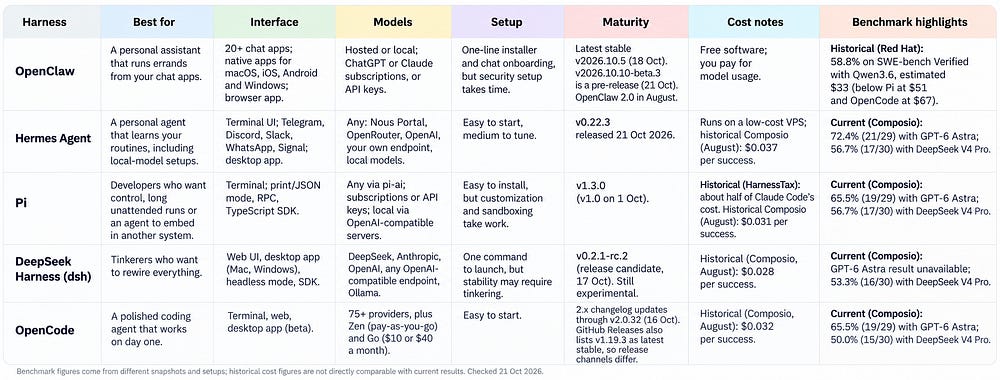
These results aren’t a definitive ranking. The current Composio figures use the same selected tasks for each model, while the HarnessTax and Red Hat results come from separate evaluations. Cost and success rates also depend on the model and workload.
Conclusion
If you’ve read everything up to this point, you’re either pretty sure which open-source harness you want to pick, or you’re more confused than when you started.
So let me help if you’re still taking your time to digest it all.
If your goal is coding and nothing else, you should go with a harness like OpenCode. If you want to code and explore a bit more, try DeepSeek Harness.
If you want to go beyond coding and actually build custom AI agents, and do crazy things like connecting your harness to home devices, that’s where Hermes Agent and OpenClaw come in.
Finally, if you’re a developer who really wants to start from the bottom and build things up, you should pick Pi.
Of course, saying it is easier than actually getting started, so the best thing you can do is experiment.
Harnesses are like books. You don’t need to force yourself to finish one if you’re not enjoying it. Give it a few hours, and if it doesn’t feel like a fit, try another.
Playing with more than one will also help you understand different architectures and develop a broader view of harness engineering, which could be a valuable skill to master in the coming years.