

I was spending too much time solving tickets and very little on innovation.
My client was asking for more and more features for a brand-new chat interface product, but the only thing I could do was fix errors.
Therefore, I decided to implement a Loop Engineering system for my AI agent so it could solve customers’ tickets on my behalf.
Around the same time, Jev, the decision-making model from TypeSafe, dropped, so it was the perfect time to integrate it into my loop.
Jev is the first System One model. In brief, it takes a state, which is a block of context, and then it needs questions for that state. Finally, it outputs the answers to those questions all at once.
The questions come in three shapes:
Choice: pick one option from a list you defined.
Score: return a number.
Noul: a calibrated probability between 0 and 1.
Knowing this, Jev was the right candidate to improve the speed and accuracy of the triage step in the loop, while the remaining steps still rely on Large Language Models (LLMs).
This piece shows a simple use case for Jev, along with a Loop Engineering system I built using the Hermes Agent by Nous Research, which you could adapt to your own customer support flow to eliminate the need for developers to fix tickets all the time.
Let’s start by understanding more about Loop Engineering. Then, we’ll look at my architecture and explain each phase of the loop in more detail.
Loop Engineering does not require an Engineer
Before you think I have the recipe for building loops, let me be honest with you. There isn’t one.
This term is quite recent, and people have come up with different ways of building them, depending on the use case.
In basic terms, Loop Engineering is a process that allows us to stop using prompts all the time for repetitive use cases. A good loop prompts, evaluates, and steers an AI agent toward a goal.
You can use Loop Engineering in the most diverse cases, as long as you have a specified goal:
Improve SEO: the AI agent will make changes to your website’s landing page, add a blog section, or get you more exposure on LinkedIn. Every month, it will check the results and make changes accordingly until the SEO is good enough.
Increase engagement on social media: the agent will publish videos and images, analyse the reactions to that content, fetch content that is similar to yours and has gone viral, optimize your videos and images to look more like those viral competitors, analyse the results again, apply changes again, and so on, until the account reaches thousands of followers.
Solve customer support tickets: this is my example, and I will explain it in more detail afterwards.
The stages of each loop can be different as well, but in general these are used:
Intake: this could be a ticket, a request, a new piece of data, a scheduled trigger, or anything else that starts the loop.
Routing: the stage that looks at the work and decides what kind of thing it is. What needs to be done? Which part of the system does it touch? Can it be handled automatically, or does a human need to look?
Solving: the stage that does the work, once routing has decided what needs to happen.
Verification: the stage that decides whether the work was actually completed correctly, as opposed to merely looking finished.
Handoff: the stage that passes the result to whoever or whatever needs to take it from there. Sometimes that’s a human, but it can also be another agent.

When the result is passed to another agent, and that agent starts another loop, we call it Graph Engineering, which is similar to what LangGraph does.
But let’s stick with Loop Engineering.
Now that you know the steps, the question is “How do I build one?”. The Markdown files are the best friends of loops, you can use them to create skills and short memory files.
In the next section, I will explain how I built mine using skills and specific commands using the Hermes Agent harness.
Loop Engineering for Ticket-Solving
Before building a loop, the best thing is to draw a schematic. It’s very easy to lose track of what we’re trying to achieve once we start prompting.
It takes just a few minutes to design the flow. Here’s mine:
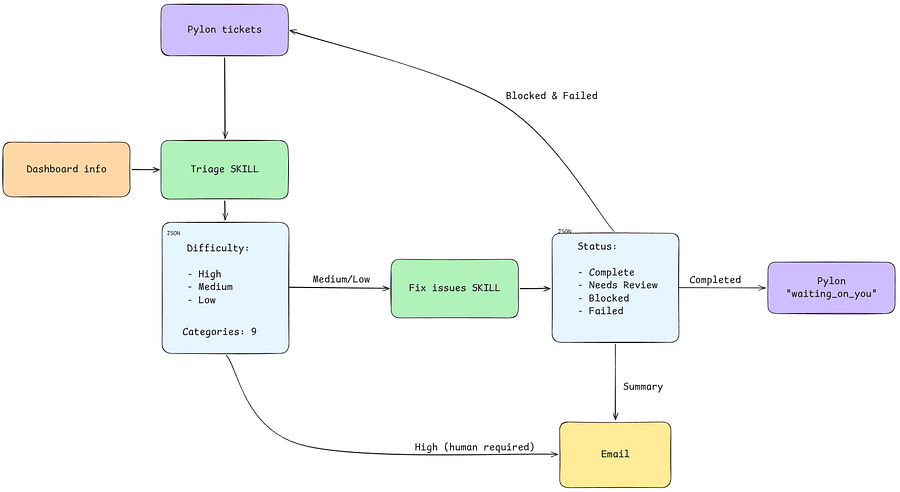
The problem
I built a chat interface for a client and added a ticket button where customers can explain the issues they experience with the interface. All these tickets are moved into Pylon, an AI-powered customer support platform.
My Hermes Agent is connected to Pylon through an API, and I can fetch all the tickets related to the chat interface from my terminal.
The problem is, every day I was fetching dozens of tickets from Pylon and fixing them one by one in the terminal.
That was the trigger for me to design the schematic above and start building the loop.
The architecture
The loop is pretty much a 4-step workflow.
Triage (read-only)
It collects new tickets from Pylon. It also spots unhappy customers who never filed a ticket and creates tickets for them.
A fast AI classifier (Jev) sorts each ticket by type and difficulty. If that classifier is down, a simple rule-based one takes over. Each ticket goes to one of three places: easy fixes go to a cheap model, hard fixes go to a stronger model, and visual and design problems go to a human.
Tickets that look like non-issues are closed only when the classifier is confident.
Triage can’t change anything. It only produces a list.
Fix and verify (sandboxed)
Each fix is attempted on an isolated copy of the code.
Before writing code, it checks whether the problem was already solved.
A fix only counts if it passes predefined rules.
Handoff
Only verified fixes move in the support desk. They’re assigned to a named support person, tagged as fixed, and given a plain-English note.
Everything else stays untouched, so support sees only what’s ready.
Support tells the customer and closes the ticket. The AI never talks to customers.
Report
A summary email goes to the team. It lists what was fixed, what was closed, what needs a human, and what it cost.
It reports only what the tools actually confirmed. If a step didn’t run, the report says so.
The repository and the trigger
The loop/worflow is a sequence of two skills, both sitting in the same folder. One does the triage, and the other fixes the issues, hands off, and reports.
This is how the repository looks:
~/.hermes/skills/loop-support-tickets/
├── run_workflow.py               # Orchestrator (routing, verify, summary)
├── loop_engine.py
├── tickets-triage/               # Triage skill (reads the “new” column)
│   ├── SKILL.md
│   └── scripts/
│       ├── triage_new_tickets.py # Entry point, classify_ticket_full()
│       └── jev_router.py         # Jev integration (the new file)
├── fix-issues/                   # Resolution skill (easy-to-moderate tickets)
│   ├── SKILL.md
│   └── scripts/resolve_issues.py
└── data/                         # Shared data directory
    ├── triage.json               # Triage output
    ├── issue-resolutions.json    # Handoff between agent and reviewer
    └── confirmed.json            # Confirmed tickets for action / review
I like to have workflows organized this way, instead of making the agent query skills from multiple places. By doing this, and also keeping the data in the same loop folder, we can make the agent retrieve information faster and save some tokens. In addition, it’s just easier for me to navigate things if something goes wrong.
Remember, while building the loop, you want to make sure you have a schematic, but also that you have some control over what you’re building. Centralizing things is the best way to do that. And the agent won’t help you with this unless you tame it.
The workflow is triggered every day at 1 PM CET with a cron job.
Now let’s see in more detail each phase of the loop!
How I used Jev for triage
The triage process is a SKILL.md that uses a Python script to fetch new tickets from Pylon. These tickets are then moved to a Jev router script that uses predefined questions in order to assign the tickets to the right categories and difficulty.
The state
Jev needs a state, which in my case is summarised information on what the ticket contains: title, conversation, and description.
The questions
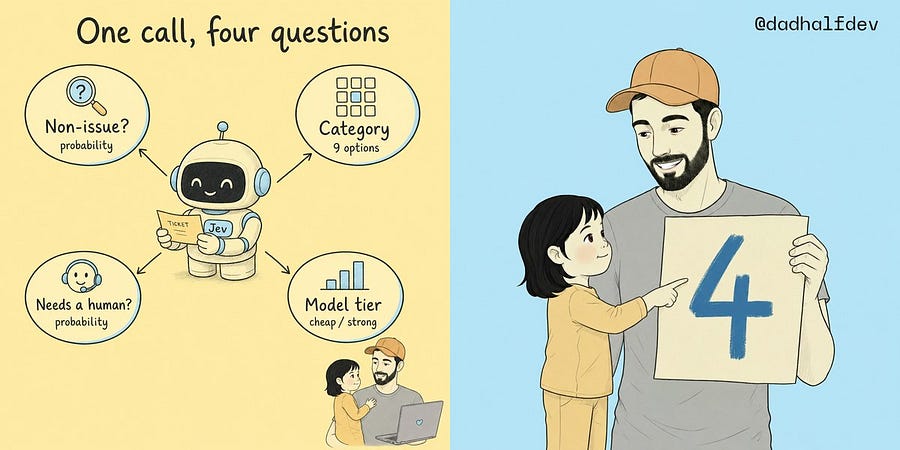
Every ticket gets the same four questions, and Jev answers all of them in a single call. These are the questions:
Is it a non-issue? A Noul: the probability that the ticket is an accidental submission, a test, or a false alarm.
What is the category? A Choice between nine options: eight defect domains (UI/UX, conversational memory, sourcing, enrichment, campaigns, data ingestion, billing, infrastructure) plus “not to fix”.
Does it need a human? A Noul for visual and layout problems that need someone with an IDE open.
Which tier should fix it? A Choice between a cheap model for isolated fixes and a strong model for complex ones.
Here is the shape of the request:
{
  “model”: “typesafe/jev-1.13”,
  “state”: “Ticket Title: CSV parser crash\nUser Note / Issue Description: ...”,
  “questions”: {
    “is_non_issue”: {
      “type”: “noul”,
      “instructions”: “Is this ticket an accidental submission, user mistake, testing ticket, false alarm, or already resolved non-issue?”
    },
    “category”: {
      “type”: “choice”,
      “instructions”: “Select the primary defect category”,
      “criteria”: {
        “not_to_fix”: “User mistake, accidental submission, false alarm, testing ticket, or please ignore”,
        “ui_ux”: “Visual layout, overlay, CSS, scroll, table display, modal freezing, UI button styling”,
        “conv_memory”: “Multi-turn context window loss, pronoun tracking, personality archetypes, hallucinated facts or model memory”,
        “sourcing”: “Prospect sourcing, search criteria, wrong companies, entity mismatch, 0 results, ignored location”,
        “enrichment”: “Contact enrichment, waterfall provider timeouts, missing email/phone numbers”,
        “campaign”: “Sequence generation, draft campaigns, sequence_json syntax, missing cadence steps”,
        “data_ingestion”: “CSV parsing, column header mapping, dataset upload, delimiter parsing”,
        “consent_billing”: “Paid action execution without approval/consent, credit balance, unconfirmed spend”,
        “infrastructure”: “Mailbox warm-up, DNS records, SPF/DKIM/DMARC, deliverability, network”
      }
    },
    “requires_hitl”: {
      “type”: “noul”,
      “instructions”: “Does this issue specifically involve visual layout, CSS styling, overlay positioning, or UI elements requiring DevTools inspection?”
    },
    “execution_tier”: {
      “type”: “choice”,
      “instructions”: “Select which execution model tier is required to diagnose and repair this defect”,
      “criteria”: {
        “gemini_38”: “Isolated deterministic code fixes: single-file regex tweaks, delimiter parsing, CSV column mapping, bracket balancing, syntax or parameter typos.”,
        “gpt_sol”: “Complex engineering: multi-turn conversational reasoning, waterfall state machines, prompt anti-hallucination, deictic pronouns, entity mismatch, or cross-file platform sync.”
      }
    }
  }
}
Now let’s see what Jev sends back and what I do with it.
Jev decisions
With Jev, all answers are typed, so the output is structured and simple to read. Here’s an example:
{
  “answers”: {
    “is_non_issue”: { “type”: “noul”, “noul”: 0.08 },
    “category”: { “choice”: “data_ingestion”, “confidence”: 1.0 },
    “requires_hitl”: { “type”: “noul”, “noul”: 0.11 },
    “execution_tier”: { “choice”: “gemini_38”, “confidence”: 1.0 }
  },
  “usage”: { “input_tokens”: 612, “output_tokens”: 118, “cost”: 0.0000257 }
}
But Jev doesn’t decide what happens to a ticket. I use another script for that, which looks at the probabilities and ensures they are high enough to trigger a decision. For instance, when Jev picks the “not to fix” category and the non-issue probability is at least 0.60.
For every ticket, triage saves the category, difficulty, tier, assigned model, confidence, and so on into a triage.json file. That file is overwritten on every run, and the next step of the loop reads it.
In the next chapter, I’ll show you how the tickets are actually solved (or not)!
Fix tickets, verify, and hand off
Once triage is done and saved to the JSON file, another skill triggers to fix the issues. This is also the most delicate part, since I don’t want the agent to do real damage and break things even more.
The daily loop runs as a pinned cron job, orchestrating the pipeline with the yolo command of Hermes Agent, so it doesn’t block on interactive confirmation prompts:
python3 ~/.hermes/skills/loop-tickets/run_workflow.py - yoloEach fixable ticket is spun up in an isolated git worktree rather than touching the production repository directly.
Depending on the difficulty Jev assigned, Hermes launches a fresh session routed to the right model tier:
Easy, isolated fixes go to Gemini 3.8 Flash:
Complex domain or conversational logic routes to GPT-6.1 Sol Pro.
Inside that session, the command /goal from the Hermes Agent is used to ensure the agent passes all quality tests. It cannot simply run one command and quit.
To make sure the agent doesn’t go rogue, the skill enforces strict rules learned from real incidents I experienced:
Before writing any code, the agent first has to write an offline test that reproduces the customer’s exact issue, and then make sure that test actually fails with the current code.
I don’t want the agent to fix the customer’s specific case by hardcoding something around it. If a customer says a particular sentence and that breaks something, the agent shouldn’t just add that sentence as an exception. It must try to understand the broader issue and fix the underlying pattern.
Another important rule is that the agent never touches the
SOUL.md. Changing the main personality file to fix a single bug can create unexpected changes across every other customer conversation. Instead, the agent has to fix the issue in the code, parsers, gateway routing, tool schemas, or wherever the actual problem is.Once the change is made, the agent runs the test suite and then boots a local server to replay the customer’s actual conversation, turn by turn. This gives us another layer of verification beyond the tests.
I don’t let the fixing agent decide that the ticket is fixed by itself. A separate judge checks the result by comparing the replay with the expected behavior. It then creates a pass file tied to that specific git commit.
Finally, the handoff step checks the git diff before marking anything as resolved. If there hasn’t been a real code change, the ticket doesn’t get marked as fixed.
The ticket handoff is executed this way:
The ticket is moved to the Customer Support queue and assigned to a named representative.
The ticket state is changed.
A private internal note is posted in plain English summarizing the root cause, what files were changed, and what tests passed, giving support immediate context to reply to the customer.
Any ticket that fails 4 attempts or remains unverified is left completely untouched in its queue.
When the daily cron finishes, an HTML summary is sent to my email, which shows the processed items, bugs resolved, non-issues auto-closed, exact credit and model spend, and generates ready-to-test prompt cards with one-click links for the escalated tickets that still need human-in-the-loop (HITL).
The workflow is not fully autonomous, but it dramatically reduced the time I was spending solving tickets.
Need to build a loop to reduce repetitive work in your pipelines? Jev and I can certainly help!
Conclusion
In this piece, I explained the steps I took to build a loop that solves tickets, using Jev for triage and several rules to make sure the tickets are fixed and not break things even more.
However, you shouldn’t ship a pipeline like this and just hope that the agent is doing a good job.
For the first five summaries I received, I took the time to see what the agent had actually done, and I tried multiple times to reproduce the issues the customers were having.
Of course, I had to make slight changes to the skills until the loop was good enough. Now I’m less worried about what it’s doing because I trust it more.
Jev made the triage much faster and more accurate. It checks which tickets get closed, which ones go to a person, and which model gets the job.
In the meantime, I also started using Jev for the chat interface I’m building for the client, not just for the loop, and we made the experience 50% faster. But that’s a topic for another article.
For now, I can focus on innovating without worrying so much about tickets. They are already decreasing, so the agent is doing a good job.