

Large Language Models (LLMs) are becoming more intelligent. Agent harnesses like Claude, Codex, and Cursor are becoming more robust, with many different features. Overall, AI is becoming easier to use, with almost no friction to get started and increasing productivity.
However, no major competitor in the field has come up with a reliable second-brain option. People are still using Obsidian, LLM Wiki from Andrej Karpathy, and GBrain from Garry Tan.
There are other solutions out there, but in the end, they all rely on the same technology: either a folder of Markdown files, a vector database, or both.
Take Obsidian and GBrain, for instance. They are both called second brains, but in fact, their purposes are quite different. The first acts more like a notebook, while the second is a retrieval engine.
Many people try to oversell Obsidian, but in the end, it is a text editor with links for Markdown files sitting in a folder. Its primary features are visualization, portability, and searchability through frontmatter. But it is not made for agents.
On the other end, GBrain keeps the markdowns as the source of truth, but adds a real engine. On every page written, three things happen:
The page is embedded. Text is chunked and turned into vector embeddings, then stored in the vector database. In addition, it uses HNSW (Hierarchical Navigable Small World) for fast similarity search.
The page is keyword-indexed. The full text goes into a column, so BM25 keyword matching works on exact names, code identifiers, and phrases.
The page is linked into a graph. References to entities such as people, projects, and tools are extracted and connected through typed relationships, allowing the system to understand how different pieces of knowledge relate to one another.
Therefore, if you’re looking for a more agentic second brain, GBrain is better, because it wil act faster, more accurately, and spend fewer tokens.
However, there’s a problem with GBrain. It was not made for you or for me, it was made for Garry Tan (the creator), and that poses an adoption issue.
In this piece, I will expose the architecture of GBrain and some tweaks I made to make it work for me, along with the pros and cons of changing the core GitHub repository.
Markdowns and backlinks are not enough
Obsidian is a collection of Markdown files that contain links to others.
For example, imagine you have a note about machine learning and another note about chemistry. In the machine-learning note, you can write [[Chemistry]]. Obsidian treats this as a link to the Chemistry note. You can also link to more specific notes, such as [[Neural Networks]] or [[Drug Discovery]]. Over time, these links create a network between your notes.
And the backlink is the other side of that link. If the Machine Learning note contains [[Chemistry]], then the Chemistry note can show that Machine Learning links to it. As you create more notes linking to Chemistry, Obsidian collects those incoming links and shows them as backlinks.
So you can open the Chemistry note and immediately see which other notes are connected to it. This is great for a visualization point-of-view, but not great for context and information retrieval.
In brief, this works for humans, but not for agents. And as the brain grows, not even humans.
Adding a vector database makes this much more useful. Because it allows agents to search for concepts rather than relying only on explicit links or exact keywords.
Meet GBrain and its architecture
GBrain is an open-source knowledge-graph engine for AI agents built by Garry Tan, Y Combinator’s CEO. He made it for himself, but ended up giving it to the world to use
Its GitHub repo already has 29k stars at the time I’m writing, with more than 4k forks.
In brief, the system is based on a directory of Markdown files, similar to Obsidian, but the files get parsed, embedded, linked, and queried through a Postgres (PGLite) database.
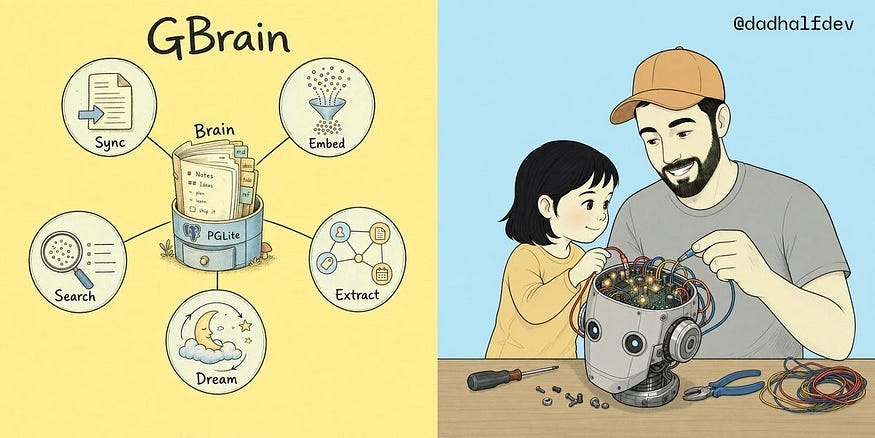
GBrain has its own CLI, so you can actually use it without an AI agent. These are the key commands that illustrate how the system works:
gbrain sync— scans the Markdown repository and imports new or changed pages into the database. It parses the frontmatter and page content, tracks changes incrementally, and, for smaller changesets, can generate embeddings as part of the import process. In other words, this is what keeps the database in sync with the Markdown files.gbrain embed— generates vector embeddings for the chunks of text that don’t have them yet. The Markdown content is split into smaller chunks, converted into embeddings, and stored for semantic search. This is particularly important after a large sync or when pages were imported without embeddings.gbrain extract— builds additional structure from the Markdown. It can extract links between entities and create timeline entries from dated information. These relationships are then stored in GBrain’s knowledge graph, allowing the system to understand connections between people, companies, projects, events, and other entities without needing an LLM call.gbrain dream— runs the background “thinking” or enrichment cycle. Instead of simply storing what is already in the Markdown files, it periodically looks across the brain to synthesize and improve the information: consolidating knowledge, finding patterns, fixing or enriching pages, and surfacing things such as contradictions or missing information. This is what makes GBrain feel more like a continuously evolving memory rather than a static database.gbrain search— queries the brain using hybrid search rather than relying on a single retrieval method. It combines vector similarity with keyword search (BM25), then applies additional ranking and reranking techniques to find the most relevant pages.
The system has other nuances that are not mentioned in the list above, but those commands are the core for a functional GBrain. Now let’s have a look at the architecture:
Vector Database: The default is PGLite, which runs in-process, so there is no server or Docker setup required, and it’s recommended for smaller brains, roughly up to 50K pages. For larger setups or multi-machine sync, it can use regular Postgres with pgvector, either through Supabase or a self-hosted instance. Yes, you can have multiple agents querying the same brain!
Embeddings: GBrain uses embeddings to represent the meaning of the content and make semantic search possible. The default for new installations is Voyage
voyage-4with 1024-dimensional embeddings, although GBrain supports several different embedding providers. For reranking, it defaults to Voyagererank-2.5.Hybrid search: Search does not depend on embeddings alone. GBrain combines vector search using HNSW, traditional BM25 keyword search, and reciprocal-rank fusion to combine the results. It then applies a cross-encoder reranker to improve the final ranking. There are three search modes:
conservative,balanced, andtokenmax.Knowledge graph and schemas: GBrain adds a type system on top of the graph, so entities can be classified as people, companies, projects, events, and other domain-specific types. There are several schema packs you can pick.
Autopilot: This is a built-in background loop that can continuously work on the brain without requiring an external scheduler. It also includes a durable job queue for running subagents and shell jobs, allowing some of the enrichment and maintenance work to happen in the background.
CLI and MCP interface: GBrain has its own CLI for interacting with the brain directly, while also exposing most of the same operations through MCP for AI agents. Some operations remain CLI-only, particularly those that interact directly with the local filesystem.
Taken together, these components make GBrain more Robust than other so-called second brains. Because it can easily scale without compromising retrieval speed and token costs, in case an agent is used.
With that being said, should you just install GBrain and forget about the others? It is not so easy, because it may not be tailored for you.
I forked the original GBrain, and you should too
Now that you know how GBrain works and its architecture, it’s easier for me to explain why I was forced to make changes to the original repository.
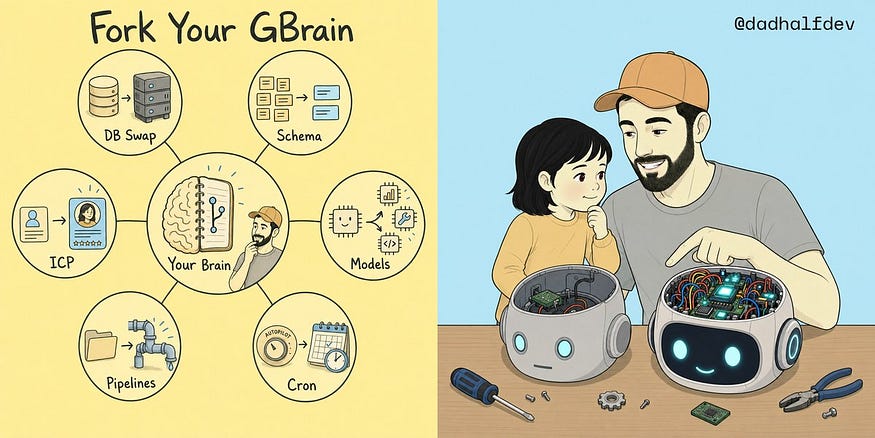
Database: From PGLite to PostgreSQL
The default GBrain setup uses PGLite, an embedded version of Postgres compiled to WebAssembly. It is a great default because it requires no server, no Docker, and almost no setup. However, it is not scalable.
That’s one of the reasons Garry Tan mentions Supabase, for a more scalable approach. I decided to start with a faster and local approach: PostgreSQL.
These are the two main reasons that made me switch:
Performance and Speed: As the brain grows and graph queries become more expensive, PGLite’s WebAssembly-based execution starts to become a bottleneck.
Concurrency: GBrain uses multiple processes running at the same time: live sync, email and calendar imports, dream cycles, health checks, and link extraction. But PGLite can only write one process to the database at a time.
The tradeoff is that this change breaks the Autopilot feature of GBrain. So I had to rebuild that automation myself!
Schema: From generic to custom
The schema is another important part of GBrain. It tells the system what kinds of things exist in the brain and how they can be connected.
The default gbrain-base schema defines 22 page types, including:
personcompanydealprojectmeetingemailslackcalendar-eventconceptmediasourcewritinganalysiscodeimagediaryeventnote
It also defines typed relationships such as works_at, invested_in, founded, attended, and led_round.
This is important because it explains the relationships between pages and what they are. The schema can also use frontmatter and language patterns to infer some of these relationships automatically. If a person page hascompany: SpaceX, for example, GBrain can turn that into a works_at relationship in the graph.
The 22 types in Garry Tan’s schema are pretty much enough, but I wanted to make the list shorter and more tailored to my needs. So I created my own schema with the following types instead: finance, hiring, task, idea, research, personal, and household, along with additional typed relationships.
This change created some conflicts with how the system is built, but I was able to solve the issues afterward. I was expecting this change to be much lighter, without breaking other parts of the system.
Model Strategy: Different Models for different jobs
The agent harness I use with GBrain is the Hermes Agent by the Nous Research team. While Garry Tan seems to be a Claude fan, I decided to go with an open-source solution.
I also don’t use one model for everything. For instance, the dream cycle runs across thousands of pages, so using an expensive reasoning model for every operation would make me spend a lot of credits. That’s why I use cheaper models for high-volume tasks and reserve stronger models for work that actually requires intelligence.
For example:
Embeddings: OpenAI
text-embedding-3-largeBulk extraction and synthesis: DeepSeek V4 Pro 0813
Reasoning-heavy tasks: Grok 4.6
Heavy enrichment: GPT-5.6 Sol
In the case of the Hermes Agent, you should also play with the auxiliary models to save even more tokens in the process. I explain how in this piece:

Automation: From autopilot to cron jobs
As I mentioned earlier, changing the vector database to PostgreSQL broke the autopilot mode, which runs synchronization, dreaming, and maintenance in the background.
Instead, I used the Hermes Agent to run the brain through explicit cron jobs:
Live Markdown: database sync every 15 minutes
Gmail and Calendar imports every 6 hours
An overnight dream cycle
Link extraction
Health checks and automatic remediation
Type-drift detection
Meeting-note processing
Person and company enrichment
Graph quality checks
Upstream update checks
This method has some benefits because it gives more control to the user for almost every step of the brain’s cycle. I can decide exactly when something runs, which model it uses, and how much it is allowed to spend.
Ingestion: From a simple folder to automation
GBrain is Markdown-first when it comes to data ingestion. Therefore the gbrain sync keeps the database synchronized with the Markdown folder.
GBrain also provides ingestion recipes for external sources such as Google Gmail, Calendar and Contacts, meeting transcripts, X, and voice, but these integrations need to be configured separately.
For example, the Google integration can pull Gmail threads, Calendar events, and contacts. Calendar events can be converted into Markdown pages, which are then imported into GBrain and embedded so they become searchable.
But instead of configuring individual integrations when I needed them, I wanted the brain to continuously ingest information from these sources:
Google Workspace — Gmail and Calendar
Granola — meeting notes and participants
Voice notes
External enrichment — web, LinkedIn, X, and other sources
These pipelines convert the incoming information into Markdown and write it into ~/brain/. From there, the normal GBrain pipeline takes over: sync the files, embed the content, extract relationships, and make everything searchable.
Enrichment: Create Ideal Customer Profiles (ICP)
Instead of having a person page that contains a name, company, and a few notes, my enrichment pipeline builds a much richer profile covering things like:
What they are building
Their motivations and beliefs
Events and presence
Achievements and deals
Network
Trajectory
The information comes from multiple sources, including X, LinkedIn, web research, calendar history, and the existing brain.
This update turns a contact stub into a useful profile, making the graph much more valuable for actual decision-making.
If you need some help creating your custom second brain, let’s talk!
Conclusion
This piece was not made to criticize GBrain or any of the other so-called second brains. It was to show that:
Markdown-only second brains like Obsidian are not made for scale and for agents.
Hybrid second brain approaches are better for information retrieval.
GBrain may need some configuration to work for your needs.
With that being said, you can just git clone GBrain’s repository and start using it connected to your favourite harness, but that by itself may not be enough.
And that’s why I made significant changes:
Created a custom schema instead of the generic one.
Used native PostgreSQL instead of PGLite, mainly because it is significantly faster and handles concurrent processes better.
Automated ingestion from Gmail, Calendar, meetings, voice notes, and external sources, so the brain grows without relying on someone to manually upload the information.
Used Hermes as the operator, handling ingestion, maintenance, health checks, and remediation.
Added a custom enrichment layer that turns basic people and company pages into much richer profiles.
My version is not better than the original one, it is a fork made for my own needs. And that’s how people should start looking at second brains.
Similar to how you pick your preferred harness (Claude, Cursor, Codex, the Hermes Agent), or build a specialised agent, second brains are no different.
So don’t be trapped by the existing options. Take one solution and tweak it! At tuik, we not only build agents faster, but we can also help you create custom second brains like the one in this article.