

Everyone is criticizing AI-slop posts and articles on social media, and we all have the right to be mad about it.
Most AI-generated content looks soulless, too agreeable, lacking strong opinions, and often feels repetitive. Without mentioning the “em” dashes and the extensive use of words like “huge”, “impressive”, and “leverage”.
Platforms like X, LinkedIn, and Instagram are being dominated by agents that reply to other people’s posts to farm engagement. But publishing platforms like Medium and Substack are no exception. I’ve found many AI-generated articles there as well.
Most of them are not pleasant to read, and overall, I think publishing platforms do a good job of not promoting this kind of content. However, some articles are actually pretty good at delivering the message.
They may not win on creativity, but they can still be informative. Sometimes, you don’t want to read five super-extensive articles just to stay informed about your niche. You would rather have a single piece that summarizes everything, and that’s something AI does very well.
Based on this premise, I decided to build a newsletter with AI agents, not with the aim of being creative or replacing human writing, but with a focus on summarizing information gathered from multiple sources.
In the following piece, I will explain the steps and decisions I made to create a niche newsletter about AI within the crypto ecosystem using the Hermes Agent from Nous Research.
A Newsletter About AI and Crypto
It’s easy to find content about Artificial Intelligence (AI) and Crypto, but it’s not trivial to find a channel that specifically merges these two. They are often two separate worlds.
This makes me search across multiple blogs and platforms until I find an article where these SOTA (State-of-the-Art) fields converge.
I wanted to eliminate that friction by creating a newsletter with articles derived from sources that connect AI with crypto and Web3. I called it: The Agentic Block.
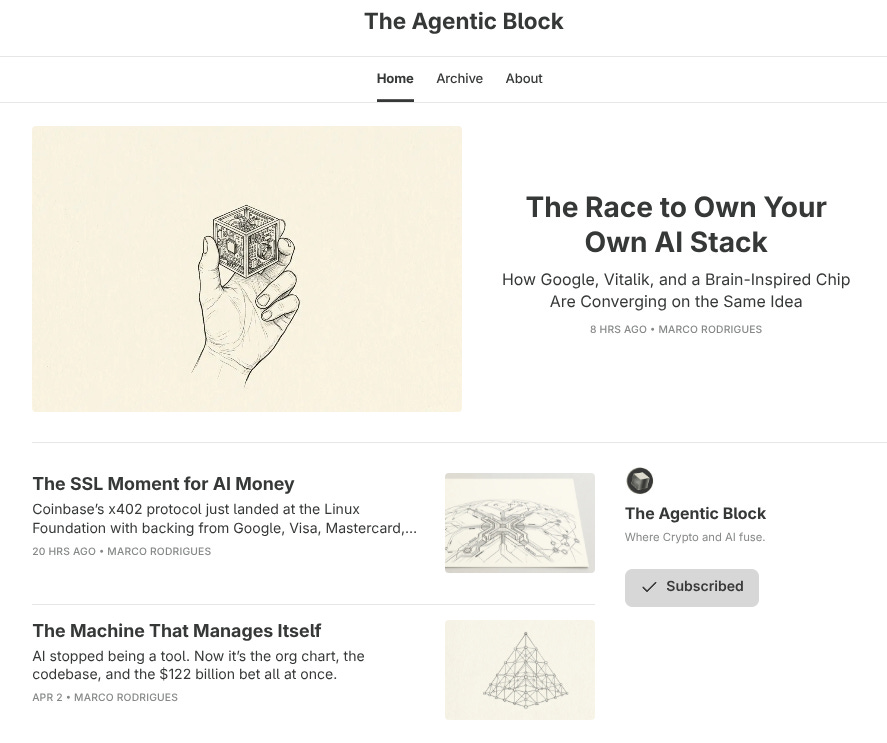
Before choosing the theme of the newsletter, I knew I needed to assemble a team of agents, each responsible for distinct tasks, notably:
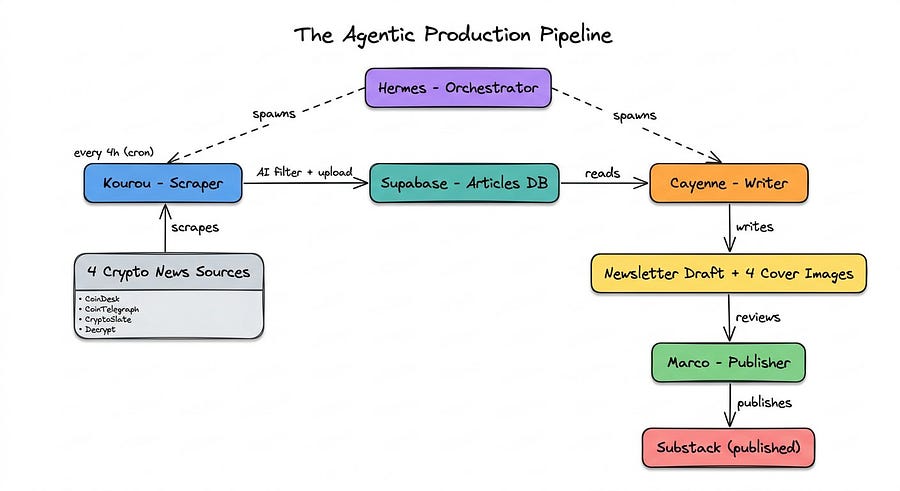
A data specialist: This agent is in charge of scraping data from multiple cryptocurrency platforms, checking whether articles are related to AI, agents, and similar topics, filtering the scraped data based on those fields, and uploading the selected articles to Supabase.
A writer: This agent writes the newsletter. It fetches the most recent articles from Supabase and applies several rules before creating the markdown file, along with three cover images to choose from.
A social media manager: This agent creates an X post based on the piece generated by the writer.
A CEO: This agent delegates tasks to the other agents and is the only one with access to the full repository. The others are sandboxed.
In this article, I’ll be referring to them as:
Kourou: The data scientist & data engineering guy.
Cayenne: The writer.
Dad Half Bot: The CEO and main agent.
What about the social media agent? Well, this one hasn’t been hired yet. I first need to see whether people are reading and subscribing to the newsletter.
At the moment, I’m publishing all content on Substack, and everything is automated except for copying and pasting the content onto the platform. This could also be automated in the future by giving browser access to my agent or by building an automated script with Playwright. However, at this early stage, I want to maintain full control over the pieces they create.
The following schematic demonstrates how the pipeline works:
Now that you know a little bit more about the project, let’s take a look at the architecture I chose to build the newsletter.
The AI Orchestration Strategy
You are already familiar with the three fundamental pieces (agents) for this newsletter. The main agent Kourou (the data specialist) and Cayenne (the writer).
Therefore, my goal was to create a simple organization using the agents above. I have both OpenClaw and the Hermes Agent installed in my remote machine. I just had to decide which one to pick.
I won’t cover how to set them up here, but I have two tutorials where you can learn how to do it.
For the Hermes Agent:

For OpenClaw:

As for the remote machine, I’m using Contabo, a German VPS provider. The instance I use is Cloud VPS 30, which comes with 24GB of RAM, 8vCPU cores, and 400GB SSD for only €11.20/month.
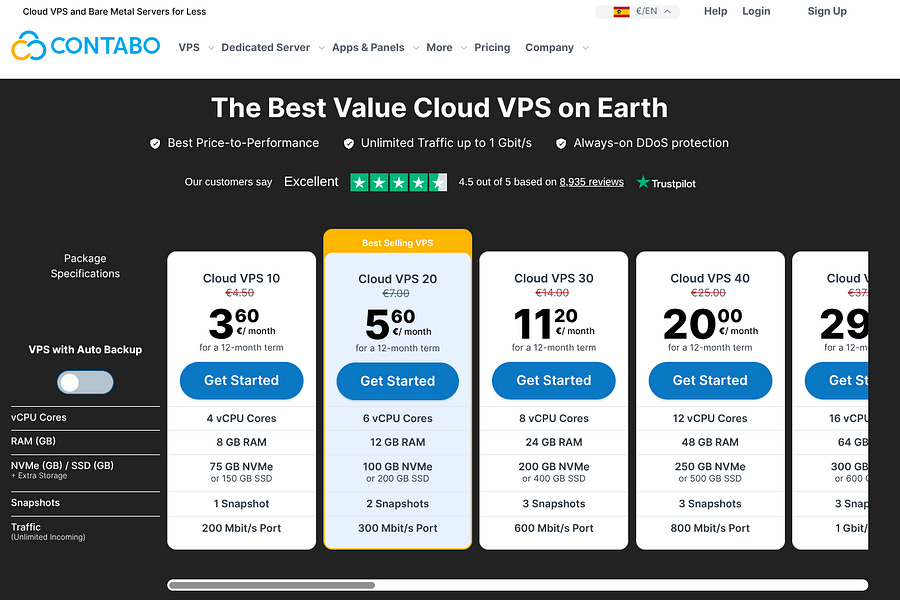
Note that a VPS is not suitable to run local models like Gemma 4 or Qwen3.5. Not because they can’t run them, but because they will be very slow.
The Paperclip approach
Both OpenClaw and the Hermes Agent can be connected to Paperclip, an open-source agent orchestrator that offers a sleek Graphical User Interface (GUI).
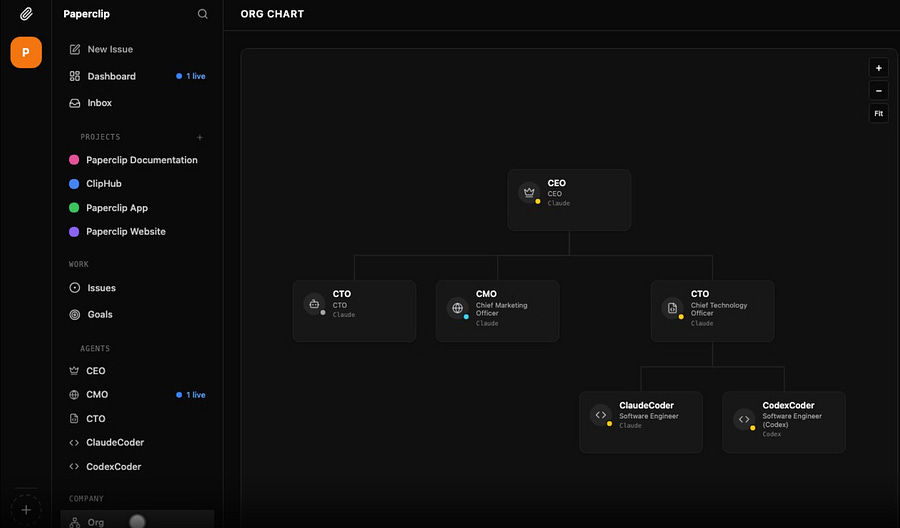
With Paperclip, you can literally build a company with zero human interaction. You just need to create the employees (agents) and start assigning them tasks.
For the Hermes Agent, you need this specific connector (find it here) to ensure Paperclip works smoothly.
And it did, until a certain point…
Not only do the agents start doing stuff they were not assigned to, but they also lack important skills and tools, so in the end, I was using the terminal more than the actual GUI.
I saw many people talking about awesome projects they had built using Paperclip, but it wasn’t for me. I wanted to have more control over what I was doing, including being able to review the scripts it was generating (my developer mindset kicking in!).
Manage multiple Hermes profiles
OpenClaw uses workspaces to manage multiple agents, each of which can have its own memory, skills, tools, and configuration files.
This feature was missing on Hermes until very recently, but a new update fixed it. Instead of workspaces, they call it profiles, and they are isolated Hermes environments.
This is how you create a new profile (agent):
hermes profile create kourou       # creates profile + command alias
kourou setup                       # configure API keys and model
kourou chat                        # start chatting
To see all your profiles, you can run this:
hermes profile listYou can also perform other actions, such as cloning them. You can see more at the Hermes documentation page.
The downside is that the Hermes Agent does not come with a built-in dashboard like OpenClaw to visualize your agents. The good part is that you can ask your main agent to build one from scratch if you need. That’s the power of vibe-coding!
Nonetheless, it is worth having an eye on this GitHub repository.
For the newsletter, I created a profile for Kourou and another for Cayenne. In addition, I modified their personalities, skins, and skills.
Whenever I need to make general modifications, such as giving them all the same skill, I simply ask the main agent to do it. But if I need to make tailored adjustments, I speak with both Cayenne and Kourou via chat or Telegram.
This approach is less visual but more efficient and gives me greater control.
In the next chapter, I’m going to show you how I customized each of them.
Customize the Hermes Profiles
The skills, tools, personalities, and overall configuration of your profiles must be aligned with their main role within the organization. There’s no need to provide over twenty skills to an agent if it will only use four most of the time. By reducing the complexity of each profile, you keep the repository clean and avoid triggering unnecessary reasoning and LLM usage just to interpret your prompts.
Choose the right model
One of the most important decisions when managing multiple profiles is choosing which Large Language Models (LLMs) should power each of them.
If API costs are not a concern, you can use the most capable models for all your agents, such as Gemini 3.1 Pro or Claude Opus 4.6. These are expensive, but they perform extremely well across most tasks, unless your priority is speed rather than reasoning depth and context handling.
I like to optimize API usage, so my setup does not rely on the most expensive ones unless I truly need them. Nevertheless, I use OpenRouter to manage all my models, avoiding handling multiple providers.
However, OpenRouter API requests can create issues when making parallel requests. Because of that, I created a dedicated API key for each of my agents.
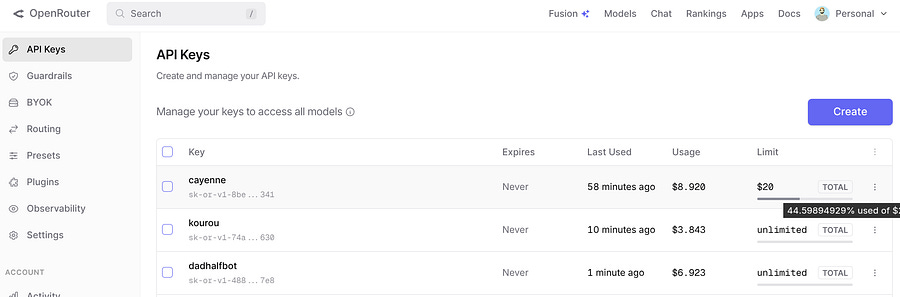
New models are always coming up on OpenRouter, and it’s worth paying attention to the free ones like Qwen3.6-plus. This model from Alibaba Cloud handles multiple input formats (text, image, and video) and has similar benchmarks to GLM-5V-Turbo from Z.ai. It’s also optimized for agents and vibe coding.
If you ask, this is the model I’m using for most agents and tasks, unless I’m spawning Cayenne (the writer):
model:
  default: anthropic/claude-opus-4.6
  provider: openrouter
  base_url: https://openrouter.ai/api/v1
auxiliary:
  vision:
    provider: openrouter
    model: qwen/qwen3.6-plus:free
    timeout: 30
  web_extract:
    provider: openrouter
    model: qwen/qwen3.6-plus:free
  compression:
    provider: openrouter
    model: qwen/qwen3.6-plus:free
  session_search:
    provider: openrouter
    model: qwen/qwen3.6-plus:free
  skills_hub:
    provider: openrouter
    model: qwen/qwen3.6-plus:free
  approval:
    provider: openrouter
    model: qwen/qwen3.6-plus:free
  mcp:
    provider: openrouter
    model: google/gemini-3.1-pro-preview
  flush_memories:
    provider: openrouter
    model: qwen/qwen3.6-plus:free
The reason she uses Claude Opus 4.6 is that she needs a high reasoning effort to come up with a creative article.
Telegram chats
The best way to communicate with the agents is through a chat interface. At least when you’re not on your computer.
I like to use Telegram, because it’s easy to set up and manage. To start, you need to create a /newbot using BotFather.
Open Telegram and search for BotFather.
Send
/newbotChoose a display name (e.g., “Hermes Agent”).
Choose a username. This must be unique and end in
bot(e.g.,my_hermes_bot)BotFather replies with your API token.
Now you need to get your user ID. The fastest way is to search for @userinfobot.
Finally, you can add your user ID and the Telegram API token inside the .env files of each of your agents:
TELEGRAM_BOT_TOKEN=8566...
TELEGRAM_ALLOWED_USERS=835...
TELEGRAM_HOME_CHANNEL=835...
This should be enough to start chatting after you restart the gateway:
systemctl --user restart hermes-gateway hermes-gateway-kourou hermes-gateway-cayenneIdeally, you’ll get something that looks like this:
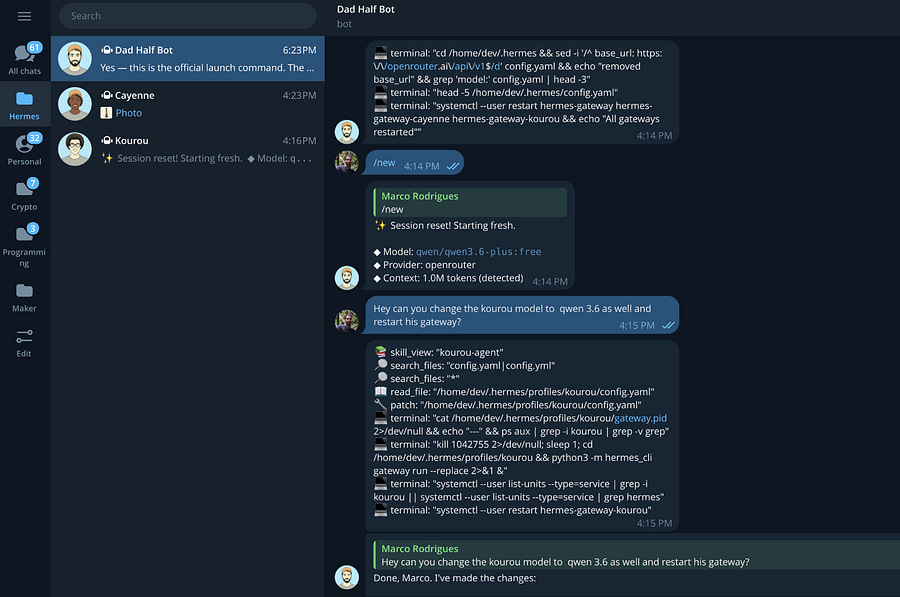
You can even separate agents per organisation folder, or add them to group chats.
Create the right skills
As mentioned before, you want to ensure each agent gets the right skills for their mission. They can be imported from sources like Clawhub, but you need to pay attention to the malicious ones.
Otherwise, you can also create them from scratch. Both Kourou and Cayenne have skills that were created based on prompts, and the markdown files point to vibe-coded Python functions.
For instance, Cayenne’s writer skill has a lot of conditions and looks like this:
---
name: writer
description: Cayenne’s newsletter writing skill. Reads up to 2-day-old articles from Supabase, finds intersection themes across 2-5 articles, and writes The Agentic Block newsletter in Marco’s voice.
---

# Newsletter Writer

## Pipeline
1. **Fetch**: Run `src/cayenne/fetch_supabase.py` (uses 48h `gte` filter on `date` column) to populate `data/cayenne/supabase_articles.json`.
2. **Generate**: Use (or fix then run) the dedicated script `src/cayenne/generate_newsletter.py`. It calls `anthropic/claude-opus-4.6` via OpenRouter + openai SDK, injects prompt with full writing rules, and writes directly to `data/cayenne/newsletter.md`. May require patching the client initialization first (api_key line is sometimes corrupted as literal “os.env...EY”).
3. **Env Loading**: `source the_agentic_block/.env && python src/cayenne/generate_newsletter.py` often fails to propagate OPENROUTER_API_KEY into venv python. Debug with execute_code first or ensure .env is loaded at session level.
4. **Style Reference (MANDATORY)**: Before writing any content, read all markdown files in `/home/dev/.hermes/profiles/cayenne/skills/writer/style/` (EXAMPLE_1.md, EXAMPLE_2.md, EXAMPLE_3.md). These are canonical style examples. Match their tone, structure, pacing, and voice when writing the newsletter.
5. **Drafting & Rules**: Script enforces 1500+ words, Marco voice, no em-dashes/semicolons, proper headers, bolded/linked companies, ## sections, *** dividers, ## Conclusion, source list. Do not generate drafts in chat.
6. **One-Article Mode**: If only 1 fresh article, proceed with it (as in Apr 2026 x402/Linux Foundation run). Still meets theme-finding intent.
7. **Visuals**: Generate 3 minimalist pencil-sketch covers using image pipeline (Gemini flash model + base64 extraction). Check mtime after.
8. **Cleanup**: Update `data/cayenne/used_articles.json` with new entry (title, url, date_used). Use robust json read with try/except JSONDecodeError fallback.

## Article Content Retrieval
- **Primary**: Use `web_extract` to pull full article content from URLs.
- **Fallback (Firecrawl unavailable)**: Use `web_search` with article-specific queries (include title keywords, source, and year). The Perplexity backend returns comprehensive summaries with inline citations that are rich enough to write the full newsletter without needing the raw page content. Run all 4 searches in parallel.

## Files
- Data source: `/home/dev/projects/the_agentic_block/src/cayenne/fetch_supabase.py`
- Used articles: `/home/dev/projects/the_agentic_block/data/cayenne/used_articles.json`
- Output: `/home/dev/projects/the_agentic_block/data/cayenne/newsletter.md`
- Cover images: `/home/dev/projects/the_agentic_block/data/cayenne/cover_1.png` to `/home/dev/projects/the_agentic_block/data/cayenne/cover_3.png`

## Writing Rules
- Style: Marco’s voice (professional yet personal, casual, first-person). Write like chatting with a friend over coffee.
- Crucial Editor Check: Do not generate drafts in chat. Write content to `data/cayenne/newsletter.md` and confirm file saved before proceeding.
- Verification Rule: List titles and dates of selected articles. **Confirm with user BEFORE writing final content.**
- **Tone Reference (MANDATORY)**: Read ALL markdown files in `/home/dev/.hermes/profiles/cayenne/skills/writer/style/` (EXAMPLE_1.md, EXAMPLE_2.md, EXAMPLE_3.md) before writing. These are the ground truth for voice, pacing, and structure. Match them closely.
- 2026 Best Practices: Authenticity, conversational. Use short paragraphs (max 2-4 sentences). Descriptive headers using strong nouns/statements.
- Title/Subtitle: Include Title (`#`) and Subtitle (`##`).
- Subtitles: Do not start with “-ing” words. Use strong nouns/statements.
- Structure: Title, Subtitle, Body Sections (##, no “Intro”), Conclusion (##).
- Formatting: No em dashes (—), no hyphens for pauses, no semicolons. Sentences must end cleanly.
- Header Formatting: All body sections and Conclusion must be `##`. Use `***` divider between all body sections.
- Bolding/Links: Always bold company names. Preferably link to official websites: `[**CompanyName**](url)`.
- Target length: Minimum 1500 words. Dive deep into mechanics.
- No “The Agentic Block” as title.
- No “this week”/”this day”/”last week”.
- Add `## Conclusion` with reflection and takeaway.
- No Signature: Never sign the newsletter with a name (like Marco or Cayenne). Leave it unsigned, even when adopting Marco’s first-person writing style.
- List Sources: `- Date, Outlet: [Title](url)` at the end.
- **No Signatures:** NEVER sign the newsletter with a name (e.g., Marco, Cayenne). Leave it completely unsigned at the end.

## Image Generation
- Style: Minimalist architectural pencil sketches or technical drawings. Monochromatic charcoal on cream paper. Ample negative space. NO text or letters.
- Pipeline: 1. Hit OpenRouter API via Python in `execute_code` (use `google/gemini-3.1-flash-image-preview` model). **API key retrieval**: env vars from `.hermes/.env` are NOT in `os.environ` inside execute_code. Use `from dotenv import dotenv_values; vals = dotenv_values(”/home/dev/.hermes/.env”); api_key = vals[”OPENROUTER_API_KEY”]`. 2. Write the JSON payload to a temp file and use `curl -d @file` to avoid shell escaping issues. Save raw JSON response as failsafe. 3. **Extract images from `message[’images’]` array first** (Gemini returns images there, NOT in `content` which is `None`). The data URI is at `message[’images’][0][’image_url’][’url’]`, split on comma to get base64. 4. Save as PNG.
- Check timestamps of images (`mtime`) after generation to ensure they were updated. If not, the generation failed.

## Update used_articles.json
- **Critical Rule**: Before writing any newsletter, always load `used_articles.json` and strictly exclude any articles already listed there (check by URL). Never reuse used articles.
- Append new entries (title, url, date_used) to the used list *only after* the piece is generated and confirmed with the user.
- **Error Handling**: ALWAYS use `try...except json.JSONDecodeError` (and optionally `ast.literal_eval`) as fallbacks when reading `used_articles.json`. Empty or malformed uninitialized files will crash standard `json.load()` operations.
You don’t need to read the full SKILL.md above. It serves only as an example in case you want to reuse it for your own project.
In addition, she also creates three cover images using Nano Banana, and I pick the one I like the most to add to Substack.
When it comes to Kourou (the data specialist), he uses a different skill that calls a Python function to scrape cryptocurrency news from Apify, filter the scraped data, and upload it to Supabase.
I built the scrapers myself, and you can also try them for free:
If Hermes or OpenClaw feels overwhelming, there’s no need to get frustrated. Book a 20-minute consultation, and let’s find a solution together:
Conclusion
The difference between this approach and a pure workflow is that I can easily make adjustments through Telegram chats, improve my agents over time, create as many profiles as I want, and decide whether I want them to run autonomously or not.
Not all use cases require agents. In fact, most of them can probably be handled with n8n workflows or Python pipelines. However, if you’re looking for more customization, creativity, and overall freedom, agents are a good choice.
That said, they come with an underlying cost that may not be feasible for everyone. If you’re a programmer, you can use cheaper models and improve the scripts manually. But if you aim to do a lot of vibe coding with minimal human intervention, you will need expensive models, and you may end up spending over $100 per day.
Agents are not the solution for everything, but they are worth exploring, and we are just getting started. What are you looking to build with them?