

You’ve probably already noticed that Artificial Intelligence (AI) videos are taking the lead on social media. According to a Statista report, generative AI now ranks as the top consumer trend across social platforms.
This growing popularity has even pushed major players like Meta and OpenAI to launch dedicated apps for creating and sharing AI-generated videos, such as Sora and Meta AI.
Most users currently consume AI videos primarily for entertainment rather than for news or reliable information. In fact, the same report shows that users are generally less likely to trust content on social media when it is AI-generated.
Nonetheless, the trust in AI content may shift with the introduction of avatars, regardless of whether they are realistic or not. If the creator can validate that the information shared by the avatar is indeed correct, people will follow and support the page, even if it is not a real person talking.
In this article, I’ll guide you through two methods for creating avatar videos using Kling AI. The first method uses Kling’s Motion Control, which replicates the movements of a real person and applies them to a character or image you provide. The second method combines text, an image, a prompt, and audio to generate an avatar video.
We’ll start by generating videos directly from the platform’s console, then move on to building a workflow that automatically generates and publishes them to social media using the Kling AI API and Python.
Create your first avatar video
You can create a free account on Kling AI, but video generation on the platform comes with a cost. New users receive a limited number of credits after registering, which are usually only enough to generate images or very short video clips.
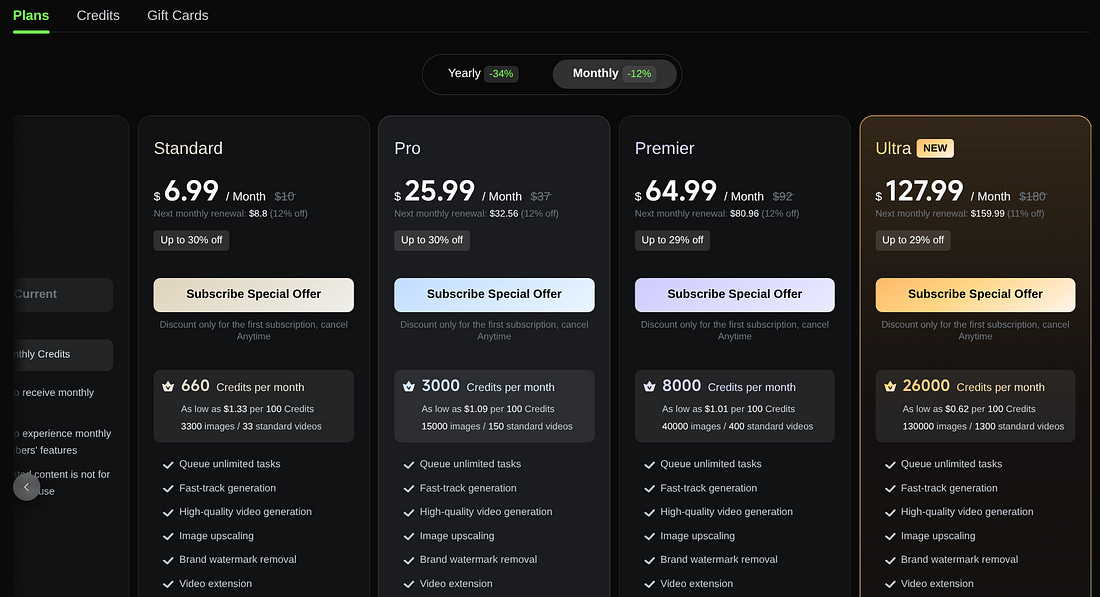
Kling offers two main pricing options: a monthly subscription or the ability to purchase credits separately. API access is priced differently and will be discussed in a later section.
I bought a few credits some months ago, but if you’re only starting, the Standard plan has more perks than simply acquiring credits. That’s because buying credits won’t remove the watermark in your videos, and $5 only gets you 330 credits, while with the Standard plan, you will get up to 660 per month.
⚠️ NOTE: If you’re planning on using the API instead, skip the above pricing options. Otherwise, you’ll be paying for using the platform and also for the API.
Before picking a pricing plan, you can see if you have enough credits to make your first experiment with the Motion Control model under the AI Video Generator tab.
This option lets you upload a reference video along with an image, which Kling AI uses to replicate the video’s movements and expressions. The number of credits required depends on the length of the reference video. Make sure you start with a short clip.
In addition, you must provide a prompt that supplies contextual and behavioral guidance for the output. You can make your avatar more extroverted and smiley or more serious, depending on how you structured your prompt.
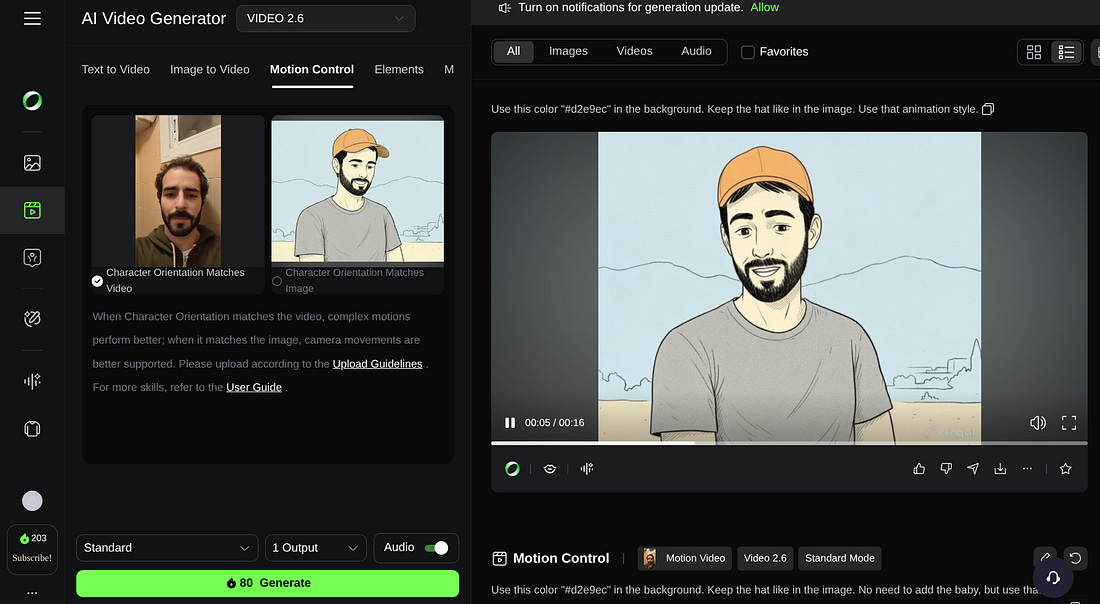
Here’s an example with an image I created using Nano Banana Pro on Gemini:
The Motion Control requires you to record yourself or have a video reference. The other approach is to create an avatar that, instead of taking a reference video, takes a text, an audio, an image, and a prompt. On Kling AI, you can do this by selecting Video and then Avatar.
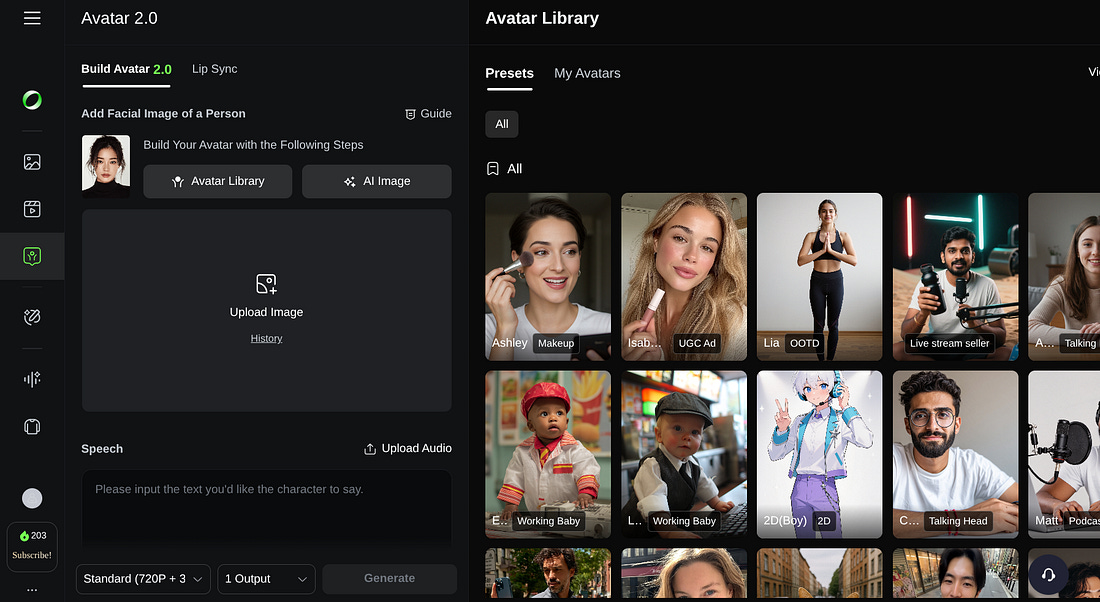
On the console, you’ll find several avatar examples ready to be used, but that’s not as fun as creating your own!
The steps are similar to Motion Control, but you need to add the speech (text) and an audio. The longer the speech, the more credits will be consumed. Instead of the text, you can also upload an audio file.
In the next section, we will use the Avatar 2.0 to automatically create informative videos based on summaries from articles. For that, we will need the Kling AI API and the Python programming language.
Create an authentication token for the Kling AI API
You can use the same Kling account to access the API console.
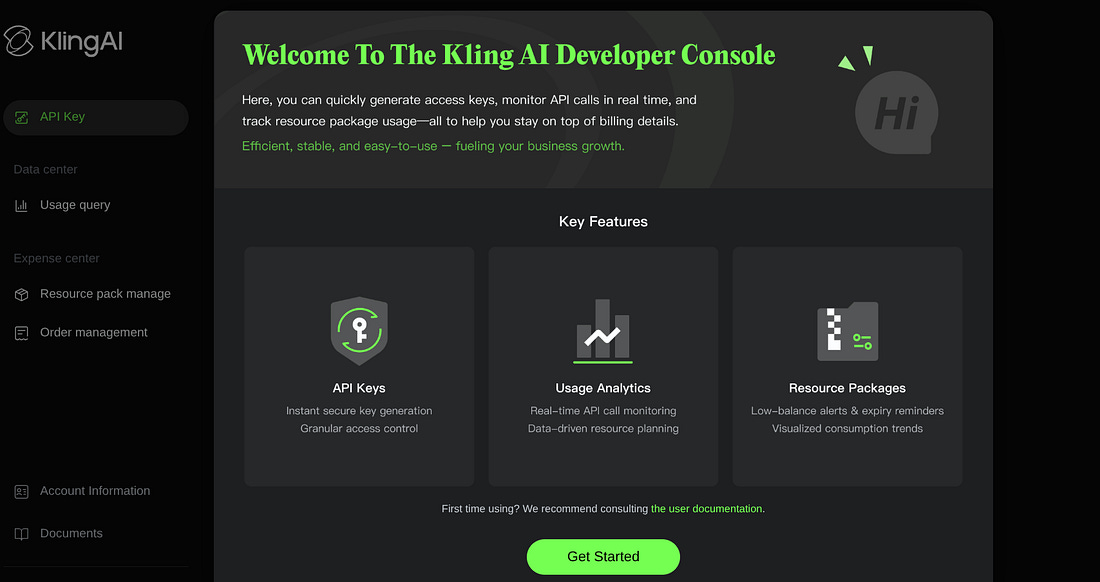
The pricing plans for the API usage are different than the ones previously discussed. In our case, we’re going to use the pricing that is visible under the Functional Models, which includes the Avatar, Lyp-Sync, and other products.
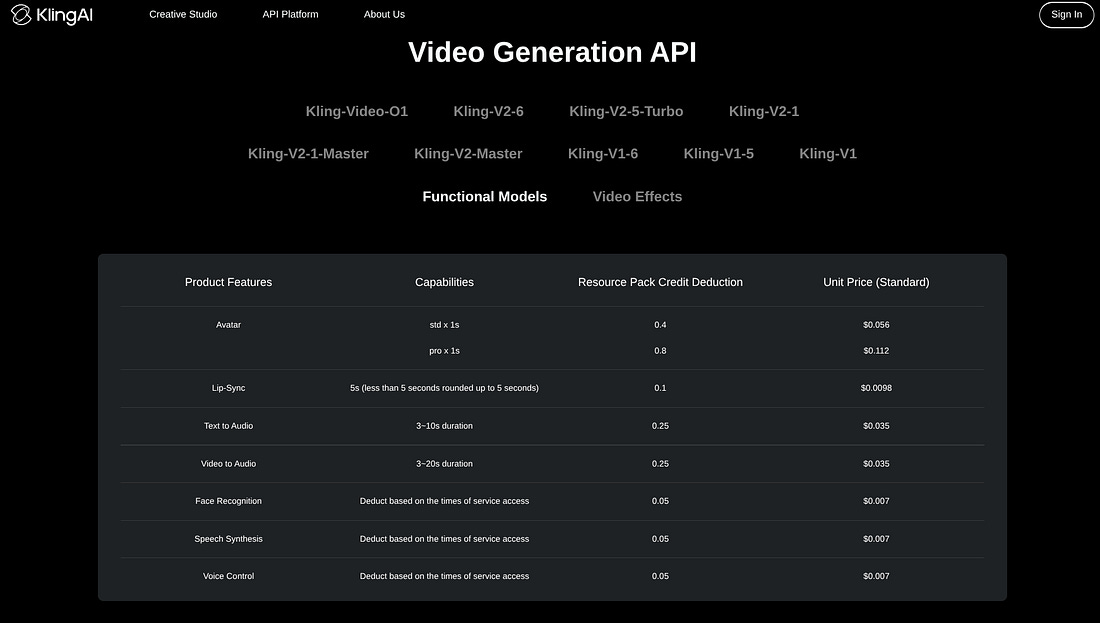
These are the available pricing packages:
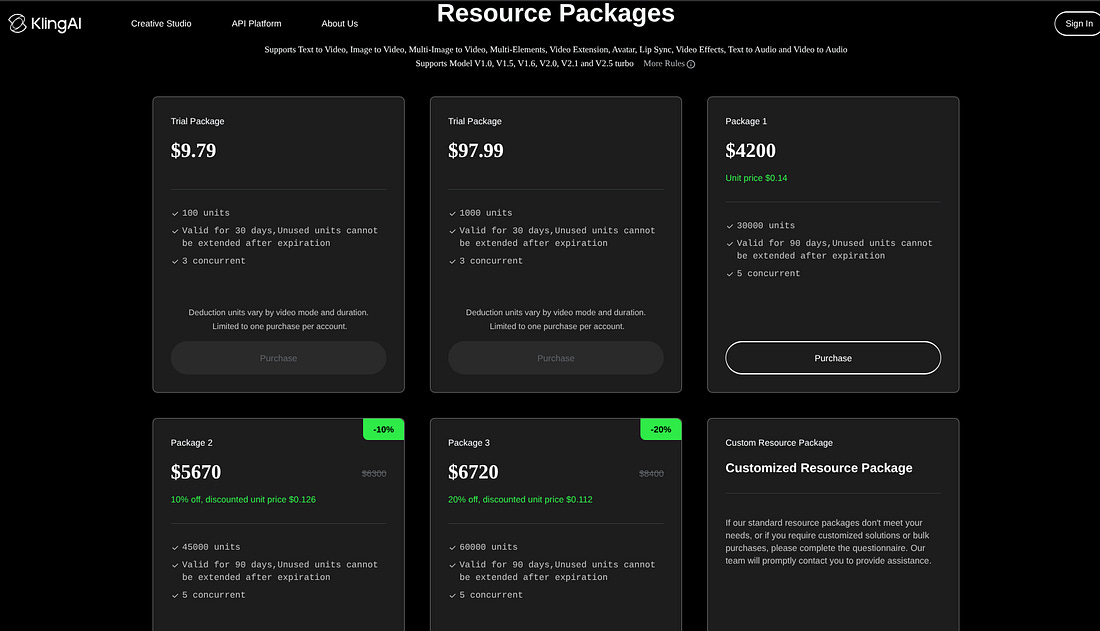
Once you’ve picked your preferred package, you can create an API key, which has an Access Key and a Secret Key.
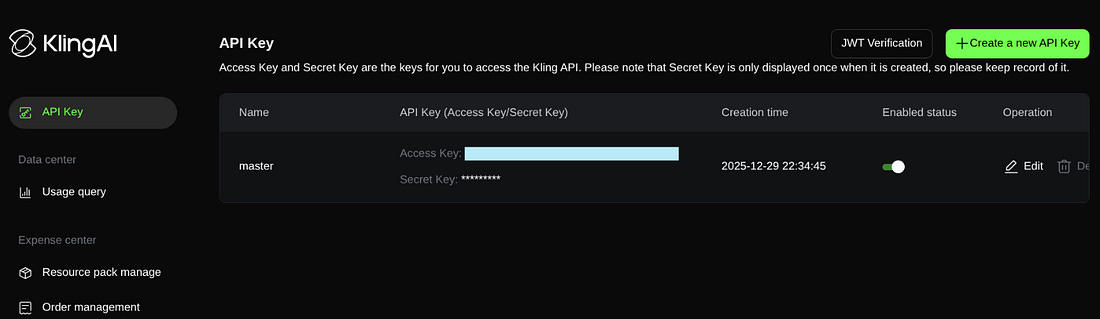
Now, you still won’t be able to make an API request with the two, you must do a JWT verification. Here’s the Python script:
import time
import jwt

access_key = “AP4...” # fill access key
secret_key = “adJme...” # fill secret key

def encode_jwt_token(ak, sk):
    headers = {
        “alg”: “HS256”,
        “typ”: “JWT”
    }
    payload = {
        “iss”: access_key,
        “exp”: int(time.time()) + 1800, # The valid time, in this example, represents the current time+1800s(30min)
        “nbf”: int(time.time()) - 5 # The time when it starts to take effect, in this example, represents the current time minus 5s
    }
    token = jwt.encode(payload, secret_key, headers=headers)
    return token

authorization = encode_jwt_token(access_key, secret_key)
print(authorization) # Printing the generated the authentication token
You can tweak the script to increase the expiration time. The output is a Bearer token that will be used for the API requests.
You can learn more about this and the following steps by reading the official API documentation here.
Create the audio and the avatar with the Kling AI API
Unlike the platform interface, where an avatar video can be created in just a few steps, using the API requires a multi-step workflow. You must first generate an authentication token (as explained earlier), then create the audio file, generate the video, and finally retrieve the video URL.
Let’s start by creating the audio file. In this case, we will choose a Voice ID from the spreadsheet provided by Kling AI.
import requests

AUDIO_URL = “https://api-singapore.klingai.com/v1/audio/tts”
API_TOKEN = “eyJhbGciOiJIUzI1Ni...”


headers = {
    “Authorization”: f”Bearer {API_TOKEN}”,
    “Content-Type”: “application/json”
}
payload = {
    “text”: (
        “Forget small steps—Ethereum is preparing for a massive leap. “
        “By 2026, the network is set to start scaling exponentially “
        “thanks to Zero-Knowledge (ZK) technology. Think of it as a total “
        “brain transplant for the blockchain, “
        “similar in scale to ‘The Merge’.”
        “Instead of every validator re-doing every single transaction, “
        “they’ll soon just verify tiny ZK-proofs. “
        “This shift could eventually skyrocket Ethereum from 30 “
        “transactions per second to a staggering 10,000. “
        “The best part? It’s so efficient you could theoretically “
        “run a node on a smartphone. While it’s a multi-year journey, “
        “2026 is when the real speed revolution begins.”),
    “voice_id”: “chat_0407_5-1”,
    “voice_language”: “en”,
    “voice_speed”: 1.2,

}

response = requests.post(AUDIO_URL, headers=headers, json=payload)
print(response.json())
The code snippet above takes a text from a Cointelegraph article as input, along with the voice_id, the voice_language and the voice_speed. The output is the URL for the voice file and the audio id. The response looks like this:
{’code’: 0, ‘message’: ‘SUCCEED’, ‘request_id’: ‘f14a385d-20b8-45a8-8469-b00d2aaded65’, ‘data’: {’task_id’: ‘835047569842642979’, ‘task_status’: ‘succeed’, ‘task_result’: {’audios’: [{’id’: ‘835047569859411990’, ‘url’: ‘https://v16-kling-fdl.klingai.com/bs2/klingai-kling-input-stunt-sgp/muse/834731746867421228/AUDIO/20251231/d147f6fa9948f358602fa42cd956bb21-f9dc5b57-6d5a-4e0b-8f37-fe06572484b0?cacheKey=ChtzZWN1cml0eS5rbGluZy5tZXRhX2VuY3J5cHQSsAFGHCN_CgjsePaPU4pF4kLs3wTWpJBrE6KgbqzxUmj753zYHmfUr372mu1-CGXxj0PJ0GTW-XLYGUjUYGHx2uENIrR53Ud_K8H3JnHMj-1YFkqx8dEVNnvpTVqylkCUqCEujdgRNETYMqctNaJdWzg3ymVJGWPQ-Ur5QKyoFPpmWzP9If7YAeN3pRXlpTYjIZNM68E_kZeGIzUAMBv2Ml60ebpaIkk9yuBeMvh8DLZBbxoSOFvh80_9xnI_XufDmu_AA0PdIiA1c1FjVWNODooKSYUEUJ6KO8OkJ3eiwBnzMN53F6ne9igFMAE&x-kcdn-pid=112781&ksSecret=7ba1734ea6d1d4e041b846623705b975&ksTime=697ba710’, ‘duration’: ‘39.384’}]}}}Now we’re going to use the audio id and an image to generate the video.
This is the avatar image I used in my video:

Here’s the script to generate the video:
import requests
import base64

with open(”character_female.png”, “rb”) as image_file:
    image_data = image_file.read()
    img_base64 = base64.b64encode(image_data).decode(”utf-8”)

headers = {
    “Authorization”: f”Bearer {API_TOKEN}”,
    “Content-Type”: “application/json”
}

payload = {
    “image”: img_base64,
    “audio_id”: 835047569859411990,
    “mode”: “std”,
    “prompt”: (
        “Create a realistic talking avatar with a natural smile and focused”
        “, confident expression, speaking directly to the camera.”
        “\n\nCamera & Background: Keep the camera fixed and do not move or “
        “alter the background in any way.\n\n”“Body Movement:\n”
        “Add subtle, natural upper-body movements (slight torso “
        “shifts, gentle head tilts, minimal shoulder motion) to avoid a “
        “static or robotic appearance.\n\n”
        “Performance style: Calm, engaging, and professional—natural speech “
        “rhythm, smooth facial animations, and realistic eye and “
        “mouth movements.\n\n”
        “Overall quality: Photorealistic lighting, stable framing, “
        “and lifelike motion without exaggeration.”)
}

response = requests.post(
    “https://api-singapore.klingai.com/v1/videos/avatar/image2video”,
    headers=headers,
    json=payload)


print(response.json())
After running this script, the video may take some time to become available, depending on the audio length. Be sure to add a delay before proceeding to the fetch step. This snippet produces the following output:
{’code’: 0, ‘message’: ‘SUCCEED’, ‘request_id’: ‘d6b40d68-6866-4b31-849e-a301036d0b14’, ‘data’: {’task_id’: ‘835047984131473475’, ‘task_status’: ‘submitted’, ‘created_at’: 1767119472638, ‘updated_at’: 1767119472638}}In the next and final step, we’re going to use the request_id and task_id to obtain the video URL. Here’s how:
request_id = “d6b40d68-6866-4b31-849e-a301036d0b14”
task_id = ‘835047984131473475’

url = f”https://api-singapore.klingai.com/v1/videos/avatar/image2video/{request_id}”


headers = {
    “Authorization”: f”Bearer {API_TOKEN}”,
    “Content-Type”: “application/json”
}

payload = {
    “task_id”: task_id,
}

response = requests.get(
    url,
    headers=headers,
    json=payload)


print(response.json())
The response has the video URL from where you can download the video:
{’code’: 0, ‘message’: ‘SUCCEED’, ‘request_id’: ‘151d0403-a017-42af-89af-668d0c2ff53a’, ‘data’: {’task_id’: ‘835047984131473475’, ‘task_status’: ‘succeed’, ‘task_info’: {}, ‘task_result’: {’videos’: [{’id’: ‘835047984186015791’, ‘url’: ‘https://v16-kling-fdl.klingai.com/bs2/upload-ylab-stunt-sgp/muse/834731746867421228/VIDEO/20251231/7bc028554e69b8b6c9527496bdfc00e6-901b7d5a-40c3-4f54-b4da-d499cfe599d7.mp4?cacheKey=ChtzZWN1cml0eS5rbGluZy5tZXRhX2VuY3J5cHQSsAH1weioZR4lXm4IjZ4hSNdgLYXSg-qYje0OYPNG_RCV-L7ISZHkFYzkwOvZ-Q2YpAt514WqvbwsB7Y648-4JFYOg0pQV_9rn2AL6UgS2MPLQDcnjSwhk4URxBFL9kKceOwExCp7a2LwoJ7MSjYgJn1HOi661_f17mkhyCzCGmGQcjsrM7x8-7IUb6iLMJ95L8jrGaln6YfxLxwRLHwHOzK2MrP334DYiQaJW7p_KrmcDhoSv3Uc89R3_xETrF65D8P8-8MOIiD_d69m8PnwyzUGrpf3N1pm6gCX1XJxFgrwpIp9kHIlCigFMAE&x-kcdn-pid=112781&ksSecret=29b1f4a65600c88cac188b609446c9bc&ksTime=697baad9’, ‘duration’: ‘39.466’}]}, ‘task_status_msg’: ‘’, ‘created_at’: 1767119472638, ‘updated_at’: 1767120346646}}Here’s the final output:
This video alone consumed around 16% of the total points available (I’m using the cheapest API pricing plan). This means that with $9.79, I can generate up to six videos, if they all have the same length.
Automate posts on social media
If you want to automate social media posts on platforms like X, Bluesky, and Instagram, you can use either cron jobs on your local machine or a remote VPS.
I prefer running automation and web scraping on a Contabo VPS, using my local machine only for testing. This keeps my main workstation free and avoids unnecessary RAM and resource usage.

I’m currently using the Cloud VPS 30 for only €11.2/month, which has 24 GB RAM (more than my laptop), 8 vCPU Cores, and 400 GB SSD. This plan is more than enough for most automation tasks, but feel free to have a look at the other VPS and VDS options available.
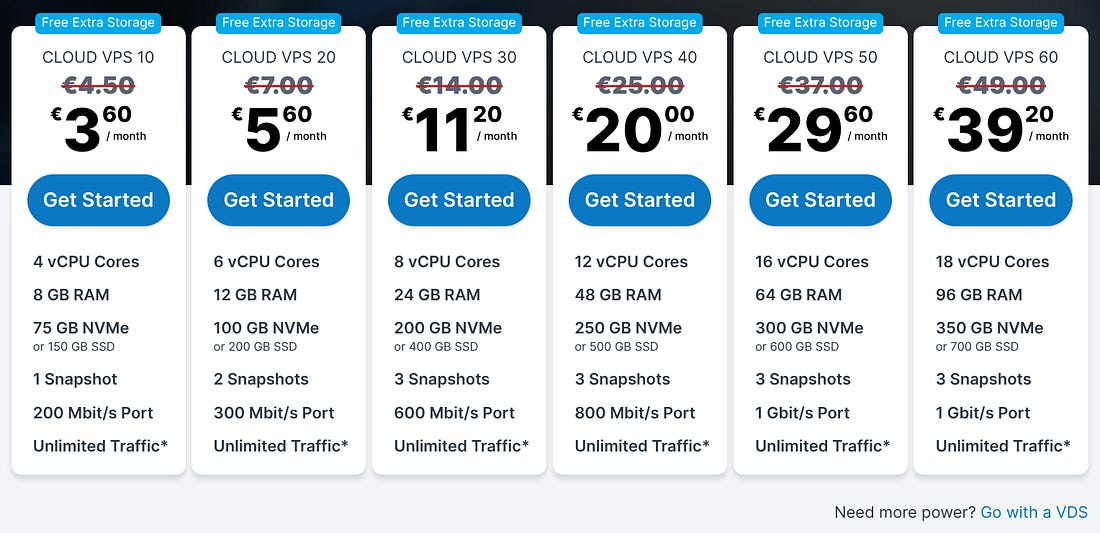
When it comes to social media posting, I’ve previously written two articles. One for X (former Twitter) and another for BlueSky.
Create a bot to publish on X

Create a bot to publish on BlueSky

If you want to build an avatar like mine that talks about crypto, tech, and world news, you’ll need a web scraper to extract fresh daily content. This content can then be summarized and used as the audio script for your avatar.
If you’re not familiar with summarizing content using LLMs and Python, take a look at the article above on building bots for X.
As for the web scraper, if you’re short on ideas, you can use one of mine:
Aljazeera Scraper: Extract articles from Aljazeera, providing essential insights into current events and regional tensions.
TechCrunch Scraper: Get the latest tech and AI news from TechCrunch.
Cointelegraph Scraper: Extract data from Cointelegraph, a leading platform for cryptocurrency and blockchain-related news.
You can find many other scrapers available on Apify.
Need help with automation, AI, or data science? Let’s talk.
Conclusion
The costs associated with creating a single avatar video can quickly add up. For example, with less than $10, I would only be able to publish six videos in total.
That said, this expense is relatively small when compared to the time and effort required to produce a traditional social media video. Recording myself talking about the latest crypto news would involve multiple takes, video editing, and careful audio adjustments.
All of these manual steps are far more costly than a couple of dollars per video.
An avatar that consistently generates content can instead be used to drive traffic to your website, support affiliate marketing, or power other growth strategies.
As we’ve seen at the beginning of this article, users are consuming more AI-generated videos than ever. The real challenge is creating an engaging, value-driven avatar. One that can generate passive income while you sleep.
csfwgwg