

Did you ever have the feeling that you installed something based on trust, rather than actually understanding what’s under the hood? That’s what I felt when I first started working with open-source AI agents.
These frameworks are complex and organized in a way that is not trivial, even for software engineers and developers. That’s because they need to be “agentic” and, therefore, more autonomous than AI-powered workflows. The repositories are usually organized to support agentic loops, without compromising the user experience.
Because of that, the agent’s memory is not a linear mechanism that simply grows over time. Instead, it’s a clever system that depends on user interactions and a robust architecture.
The Hermes Agent has something that the Nows Research team called “persistent memory”. Many people liked the term and instantly migrated from OpenClaw to Hermes. But what does it actually mean? How is it different from OpenClaw? And how can it be improved?
When we think about human memory, we usually imagine it as a container (our brain) that can keep storing more and more information. But, still, we end up forgetting some things, usually the information that we considered less relevant.
The Hermes Agent tries to mimic this behavior by introducing five layers to the memory process. They are:
Memory Store
Sessions Database
Compression Mechanism
Procedural Memory (aka Skills)
External Memory Providers
Let’s have a look at each one of these layers in more detail.
1. The Memory Store
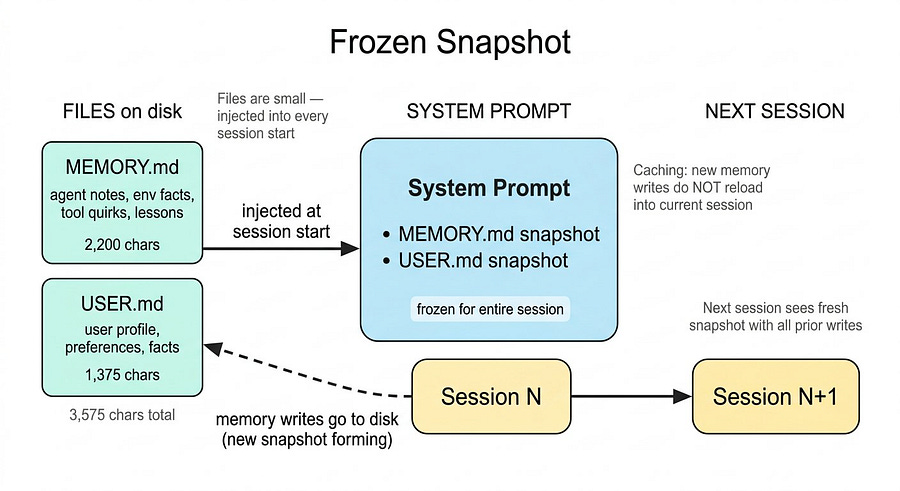
This is the smallest layer, and it’s made of two files inside the agent’s or profile folder. They are:
MEMORY.md: consists of agent notes about environment facts, tool quirks, and lessons learned.USER.md: consists of what the agent knows about you, and it’s usually not modified, unless you tell it to.
These files are very short. In total, they use 3,575 characters of information, with 2,200 characters for MEMORY.md and 1,375 for USER.md.
The size of these two files is small because their content gets injected into the system prompt at session start and stays there for the entire conversation. You definitely don’t want huge files to read each time the session starts, not only because it would consume unnecessary credits, but also because it would slow down your agent and make it less reliable.
When memory is updated, the new information is saved immediately. However, the agent does not reload that memory into the current session. Instead, the session keeps using the previous MEMORY.md, which helps preserve caching and keeps inference fast and cost-efficient.
This is the frozen snapshot pattern, and it is worth understanding. The agent sees a consistent view of you and the environment for the whole session. The next session gets a fresh snapshot reflecting all prior writes.
This is what a MEMORY.md file looks like:
Switch to anthropic/claude-opus-4.6 for newsletter generation, then switch back.
§
Newsletter formatting preferences for the user:
- Follow ‘writer’ skill pipeline (no em-dashes, no semicolons, bold/link companies, H2 headers, dividers).
- Target 1000-1500 words. Every paragraph must earn its place. No repetition.
- NO temporal framing: never “this week/month/year/recently” - daily newsletter, these get repetitive.
- Don’t force-explain how articles connect; weave into one natural coherent narrative.
- Write straight to ‘newsletter.md’, always include article source list at end.
- Be autonomous, no needing approval. Generate 5 tags per piece.
No signatures at end of newsletters (Marco, Cayenne, or any name). Rule in both skill and user prefs.
§
Sources format: **Sources:** (bold, standalone line) + blank line + `- Mon Day, Year, Outlet: [Title](url)` — title is a markdown link, URL belongs to the title, not a separate trailing URL. Tags never appear in the newsletter file; share them in chat after generation.
§
When requested to share the markdown/newsletter, NEVER paste the file content directly into the chat. ALWAYS serve it exclusively via a MEDIA: path. Also: user wants 5 catchy tags generated alongside each newsletter for publishing.
§
By the way, this is the memory of my writer agent. You can learn more about it here:

You probably noticed that all entries are separated with §. You can remove them manually or directly ask your agent to add, replace, or remove entries.
In your config.yaml, you can also tweak the size of your MEMORY.md file:
# In ~/.hermes/config.yaml
memory:
  memory_enabled: true
  user_profile_enabled: true
  memory_char_limit: 2200   # ~800 tokens
  user_char_limit: 1375     # ~500 tokens
Now let’s see the second layer of the memory process.
2. Sessions Database
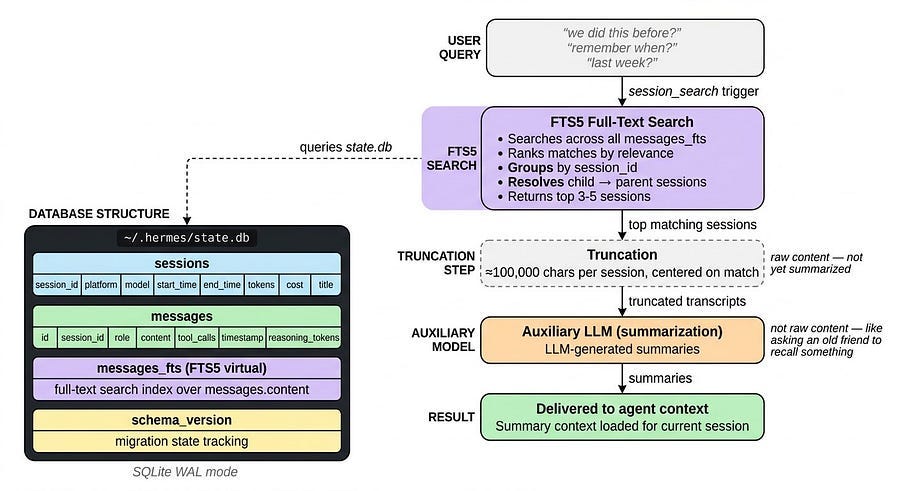
Every time you start a new chat with your agent, regardless if it is on Telegram, WhatsApp, or Terminal, a new session is created. And every message in every session gets stored in a SQLite database (state.db) with full-text search.
The database has two core tables.
The
sessionstable: holds metadata like source platform, model, start and end time, token counts, cost, and title.The
messagestable: stores every single message with role, content, tool calls, timestamps, and reasoning tokens.
There is also an FTS5 virtual table for full-text search across all that content. Here’s the architecture overview:
~/.hermes/state.db (SQLite, WAL mode)
├── sessions          — Session metadata, token counts, billing
├── messages          — Full message history per session
├── messages_fts      — FTS5 virtual table for full-text search
└── schema_version    — Single-row table tracking migration state
You can think of state.db as your agent’s long-term memory, and it can be accessed when you use expressions like: we did this before, remember when, last week, etc.
This triggers Hermes to use the session_search tool, which runs an FTS5 search across all messages, ranks the matches, groups them by session, and resolves child sessions to their parent. It then loads the top three to five sessions and truncates each to around 100,000 characters centered on the matches.
That truncated content goes to a small auxiliary model with a summarization prompt. The result is LLM-generated summaries, not the full raw content.
Just like when an old friend asks you about something you both did five years ago, it may take a while to remember it, and you won’t recall the full details, it’s a summarized version of that memory.
3. Compression Mechanism
What happens when a conversation gets too long? The model starts losing context.
The compression mechanism (ContextCompressor) is triggered at 50% of the model’s context window. For instance, for a 200K-token model, compression activates at 100K tokens, well before the limit is hit.
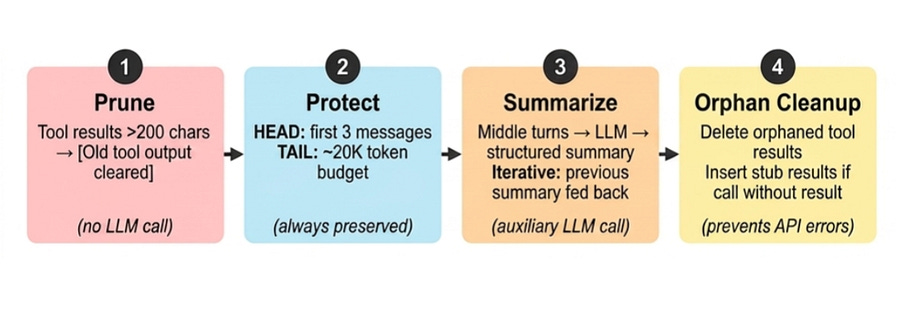
The ContextCompressor Python class is based on 4 steps:
Prune old tool results: tool results from the middle section are replaced with a short placeholder:
[Old tool output cleared to save context space]. This is a string-level operation with no LLM call. Only results larger than 200 characters are pruned.Protect head and tail: the
headis the beginning of the conversation, and it is always preserved intact. The same happens to the most recent messages. Everything in the middle is summarized.Structured LLM summarization: the LLM summarizes the middle part, and on subsequent compressions in the same session, the previous summary is fed back into the prompt as context.
Orphan cleanup: the LLM provider API requires every tool call to have its matching result immediately after, but compression in the middle can break this. This step fixes that by removing or inserting a stub result.
After compression, the message list contains all head and tail messages (protected) and a structure summary-compressed middle turns.
The compression mechanism can be tweaked in the config.yaml file:
compression:
  enabled: true
  threshold: 0.85
  target_ratio: 0.2
  protect_last_n: 20
  summary_model: google/gemini-3-flash-preview
  summary_provider: auto
  summary_base_url: null
4. Procedural Memory
While MEMORY.md and USER.md are part of the factual memory, they specifically represent what the agent knows about the user. Skill files, on the other hand, are the agent’s procedural memory, and they represent what the agent does.
Since MEMORY.md is intended to remain small, you should avoid storing information there unless it is used frequently and is independent of any specific skill.
You should generally instruct the agent to store the information in skill files, even if they were already saved into memory. This way, the agent does not need to remember things. It only needs to follow instructions.
With skills, procedural knowledge lives on disk at ~/.hermes/skills/ as separate Markdown files. Skills can be:
Persistent: always loaded in the system prompt (good for small, always-needed knowledge)
Transient: loaded on demand when triggered by a skill slash command or explicitly loaded by the user
Skills are pulled in only when relevant. This keeps the system prompt small while still giving the agent access to extensive procedural knowledge without polluting its limited, always-loaded memory.
One skill that alone can serve as a semantic/institutional memory is the llm-wiki, which allows you to interact with Karphathy‘s (co-founder of OpenAI) LLMWiki.
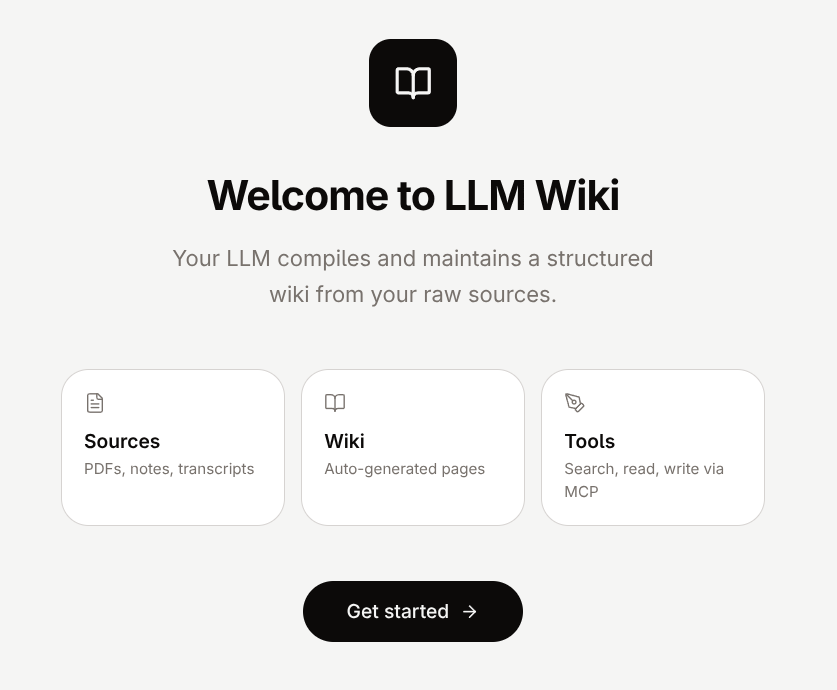
The Hermes Agent, by default, allows you to create your wiki, ingest documents, query them, and perform other actions.
Think of this like Notion or Google Drive, but every piece of information is converted to markdown files, so AI agents can read and find it for you.
You can use this to make your agent an expert in a specific field, without compromising factual memory. Just ask, and it will retrieve from the wiki.
You can also connect LLMWiki to Obsidian to create a graph structure of all files.
5. External Memory Providers
If all the memory options are still not enough for you, several memory extensions can be integrated into the Hermes Agent.
Here are 8 of them:
Mem0: Extracts atomic facts from conversations and stores them using a vector database plus a knowledge graph.
Zep: A lightweight memory layer focused on persistent chat history and vector-based recall.
Letta: Formerly known through MemGPT, it uses a layered memory system with core and external memory, similar to operating system paging.
Honcho: A multi-entity memory system built around dialectic reasoning, with post-conversation pattern extraction through Neuromancer.
OpenViking: Organizes agent context like a filesystem, using a hierarchical structure and the viking protocol.
Hindsight: A biomimetic memory system split into four banks: World, Experiences, Skills, and Semantic memory.
ByteRover: Treats memory operations as first-class agent tools and structures knowledge through a Context Tree with real-time feedback loops.
Supermemory: A context infrastructure layer for AI agents that combines user profiles, memory graphs, retrieval, extractors, and connectors.
There is no single best option in the list, you’ll need to look through them and decide which one you like most. You can also simply try them out, since setting them up in Hermes is straightforward. You just need to run these commands:
hermes memory setup      # pick a provider and configure it
hermes memory status     # check what’s active
The providers work alongside the built-in memory, and they don’t replace it, they are just an upgrade
If Hermes or OpenClaw feels overwhelming, there’s no need to get frustrated. Book a 20-minute consultation, and let’s find a solution together:
Conclusion
After doing this research, I realised how well thought-out the Hermes Agent memory system actually is.
Everything was designed to balance recall, efficiency, and autonomy. Instead of treating memory as a single infinite storage box, Hermes approaches it more like humans do:
Keep what is immediately important close
Compress what becomes too large.
Retrieve what was said in the past when needed.
Rely on procedural knowledge to avoid unnecessary repetition.
This makes the AI agent cost-efficient while still feeling persistent and context-aware over long periods of time. It does not try to remember everything all the time. It remembers the right things in the right place.
I wonder if there will be open-source agents that can beat this memory mechanism. You almost don’t need extensions to do most things if you rely a lot on skills.
You can find more about Hermes’ persistent memory here.
I’m starting to envy the Hermes Agent’s memory architecture. I wish mine were as good.