

Let’s be frank here, freelancing platforms are wild! And Upwork is probably the wildest of them all, making you pay hundreds of dollars even before landing your first job.
When I first started freelancing on Upwork, there was no bidding system, meaning I only used Connects (the platform’s currency) to apply for jobs.
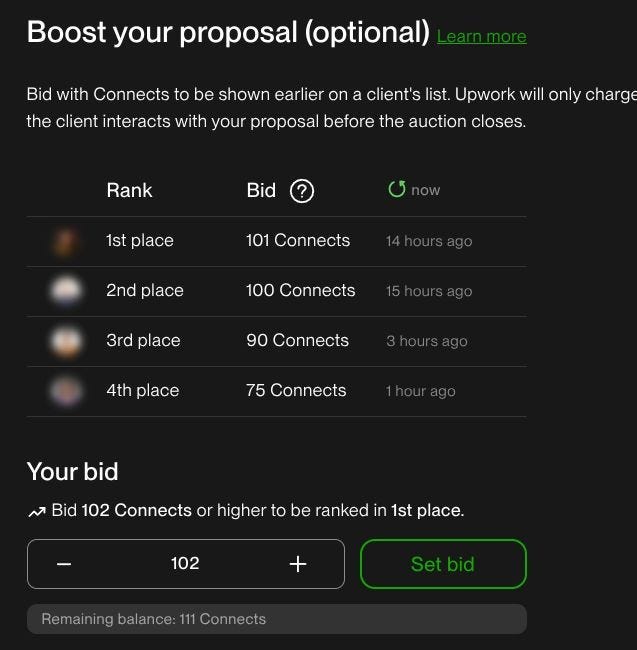
But not too long ago, the platform introduced a bidding system, and what once looked like a fair setup quickly turned into a gambling game, where all that matters is being seen by potential clients.
The rules of the game are simple: you bid, and if your application is seen by the client, you lose all the Connects you’ve bid for that position, hoping you’ll be the one picked.
This bidding gambling game has become so competitive that you may now need to pay over $30 just to apply for a single position.
Now, how can someone start freelancing on Upwork if they are spending more on the platform than they actually earn?
According to a report by DemandSage, Upwork is the leading platform with over 18 million freelancers worldwide, where 25.6% of them are in the United States, 13.5% in Philiphines, 12.5% in India, 3% in the United Kingdom, 2% in Canada, and 43% in other regions of the world.
This is also a company that generated between $782 million and $787 million in revenue in 2025 alone, and it is expected to grow by 6–8% in 2026.
With that being said, Upwork has a competitive advantage and the resources to create one of the best freelancing experiences for both recruiters and applicants. However, according to several G2 reviews, users are increasingly complaining about the new system and how difficult it has become to land a contract.
The biggest challenge is the limited number of Connects compared to the number needed to apply for jobs. With only a small amount provided each month, freelancers often have to purchase more just to stay competitive, and those credits disappear whether or not a client ever views the proposal. On top of that, the competition is extremely high, with some job posts receiving hundreds of bids. — Jennifer D. on G2.
I’ve already criticized the platform enough. The truth is that they must be doing something right to have over 18 million freelancers and over 5 million clients. I’m one of them, and I’m not planning on leaving. In fact, I always try to bring new clients to the platform.
But since Upwork is now a Connects burning machine, I had to change my strategy and focus on getting invitations instead of applying for positions.
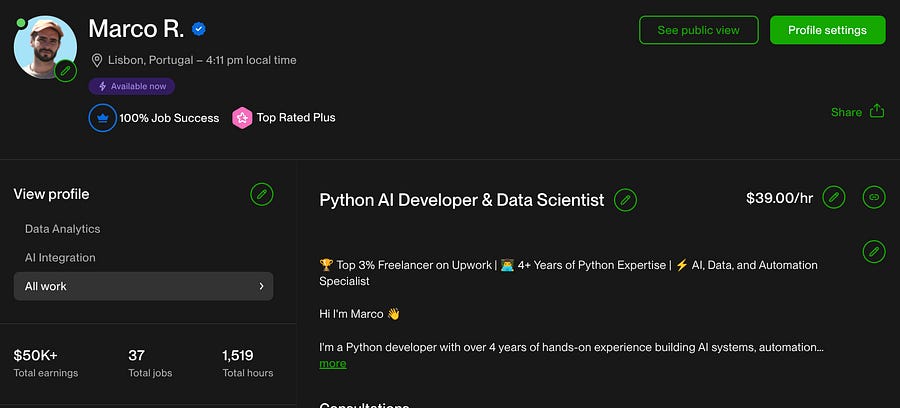
In this article, I’ll guide you on how to make the most of the platform and earn the Top Rated Plus badge as I did, without spending all your money on Connects.
More Hours Don’t Mean More Reputation
The reason I started freelancing wasn’t that I was tired of working for companies, but because I wanted more free time to spend with my baby daughter. I couldn’t find a better option that allowed me to both spend my mornings with her and work in the afternoons.

I chose to work on Upwork because I already had an account and because there is a strong demand in IT (according to DemandSage, 34% of the demand is in Web, Mobile, and Software Development).
The first few months were very hard. I had to set a low hourly rate, and I wasn’t able to deliver more than 5–6 hours per day, so I couldn’t apply for contracts that required 40 hours per week.
However, that didn’t stop me from achieving the Rising Talent badge, then Top Rated, and finally Top Rated Plus.
Many people think that when you’re starting on Upwork, you need to work 18 hours a day at super low rates and with all sorts of clients. That’s simply not true.
If you’re working for someone who doesn’t value your skills (meaning they underpay you), most likely they also won’t care about treating you well or leaving a good review at the end.
You need to work according to what you’re capable of delivering, both time-wise and skill-wise. Naturally, the platform will reward you with better visibility as you maintain a high success rate and strong reviews.
Also, make sure to communicate through Upwork’s chat, even if the client prefers Slack or another app. Being active on the platform matters for the algorithm.
Find the Best Way to Showcase Your Skills
When you’re applying for a position, you have literally one chance of grabbing the attention of the potential client.
I don’t know the ultimate formula, but I do know what worked for me in the beginning.
I was never overly technical in my applications. I always used a friendly, informal tone and focused on showcasing what I was capable of delivering. To do that, you need to find a way to clearly communicate your skills.
For me, that was through Medium articles.
If I were applying for a web scraping job, I would include links to articles I had written about web scraping. That way, the client had proof that I was indeed capable of delivering the work.
Here’s an example:
Hi, I’m Marco :)
I have several proven experience with web scraping, you can see some of my work here:
1. Google Maps Web Scraping: https://levelup.gitconnected.com/web-scrape-google-maps-reviews-with-playwright-for-free-7d6f42f1719d?sk=42c46fb12bd1417fe306745dcddce37d
2. YouTube Web Scraping: https://levelup.gitconnected.com/how-to-scrape-youtube-data-for-free-727b78fdd0d8?sk=6559cb4407222c648faefd1402c18b67
3. Scrapy and Playwright: https://medium.com/python-in-plain-english/combine-playwright-with-scrapy-for-web-scraping-c7c00168f567?sk=b3bfa671e91b1551ccf624b6e03507d0
4. Create an Apify actor: https://medium.com/python-in-plain-english/how-i-published-my-polymarket-web-scraper-on-apify-b616bba648c8?sk=0d4eb946290c29cb5e16ced4fbd679ac
The articles above are just some examples of what I can do with tools such as Playwright, Beautiful Soup and Scrapy.
Kindly let me know what website you’re willing to scrape.
Looking forward to hearing from you!
I find GitHub too technical for this purpose. Many people hiring on these platforms aren’t technical themselves, so they’re looking for a friendly way to understand your stack without having to read code.
The important thing is to find a way to communicate your work that best matches your personality. It can be through YouTube videos, LinkedIn posts, presentations, articles, etc. It doesn’t really matter, as long as you make the client feel confident that you’re the right fit.
Be Prepared to Say “No”
One of the biggest mistakes beginners make on Upwork is applying for or accepting every offer they see.
This is totally wrong. Let me tell you why.
The client’s score is important
Just like freelancers, clients also receive a score after a contract is completed. Ideally, you want to work with people who have high scores (this applies to both sides).
If you’re applying to positions where the client has a low score or no score at all, you’re taking a risk.
Don’t get me wrong, I’ve worked with many clients who were new to Upwork. However, I always made sure to have a short call with them before starting the contract.
Pay attention to the first interaction
If possible, try to have a short call with every client, even those with high scores. Sometimes, the first contact says a lot about the kind of working relationship you’re about to have.
So even if you’re in the interview process with a client who has:
A high score.
Many reviews.
The ability to pay fairly.
If you don’t feel good chemistry during the interview, it’s often better to trust your instincts and decline the offer.
This may sound demanding for beginners, and sometimes you do need experience handling different client personalities before learning to say no. I agree. But once you reach a point where you truly understand your ideal working environment, lean into it.
Negotiators are a red flag
Many times, you’ll come across clients who want to slightly reduce your hourly rate, and that’s totally understandable, especially for mid to long-term contracts where there’s room to increase the rate over time.
However, be cautious with clients who negotiate too much. In most cases, these are the same people who will later complain about the number of hours you log. This often leads to a poor working experience, where you, as a freelancer, may be forced to log fewer hours only to avoid a bad review at the end (and you may still receive it).
Be careful with non-technical clients
Related to the previous point, the clients who criticize the time spent on tasks are often those who lack technical knowledge. They usually don’t understand the difference between building, debugging, and optimization (especially in programming-related work).
It’s completely normal for clients not to have the same technical background as you do, that’s why they’re hiring in the first place. Ideally, though, they should be willing to learn or at least have a general understanding of what the job involves.
Unfortunately, these types of clients often post unrealistic job offers or have no clue about the effort required to complete the work.
Make Your Profile Shine
We need to trust Upwork’s algorithm. If we do, we know that the better our profile is, the more likely we will appear in the results when clients are looking for our skills.
You should start by creating a job title that highlights the best of what you do. You may be able to do programming and marketing, but never mention the two in the same job title. You can create separate profiles for that.
The best is to look at the best professionals in your field and try to use similar job titles and descriptions.
For the latter, make sure you don’t use AI. The algorithm detects what is AI-generated and what is not, and clients will see you as “fake”.
Try to highlight your goals, projects, and previous work with clients (even if they were outside of Upwork).
Here’s my description:
🏆 Top 3% Freelancer on Upwork | 👨💻 4+ Years of Python Expertise | ⚡ AI, Data, and Automation Specialist
Hi I’m Marco 👋
I’m a Python developer with over 4 years of hands-on experience building AI systems, automation workflows, and data-driven applications for clients across multiple industries.
I began my career at the French Space Agency (CNES), working in Microelectronics and Failure Analysis, before transitioning to Software Engineering at the agency’s French Guiana spaceport.
After that, I was faced with the amazing news that I was going to be a father, so I decided to embrace freedom and take on a new challenge: working for myself.
Now I’m a Dad Half Dev 👶👨💻
50% Parenting
50% Data Science, AI, and Automation🌍 I speak: English, French, Spanish, and Portuguese.
⭐ Highlights
↳ Developed 5+ MVPs that successfully secured funding.
↳ Completed 35+ Upwork contracts with a 100% success rate.
↳ Built and currently maintain scalable data pipelines for 3+ companies.
↳ Implemented AI APIs and Large Language Models across 10+ diverse projects.
↳ Developed advanced Retrieval-Augmented Generation (RAG) systems using the latest AI frameworks.
↳ Designed and deployed 3+ modern web dashboards using Dash Plotly, and React components.
↳ Built custom automation bots with LLMs and generative AI (avatar videos and images) for various social media platforms
↳ Authored high-level technical content for 2+ international clients.
↳ Built 20+ web scrapers on Apify.
↳ Created multiple Exploratory Data Analysis (EDA) pipelines for diverse subjects.
↳ Built pipelines to automate PDF report generation with insightful charts and stats.
🧠 Skills & Tools
↳ AI & RAG Systems: LangGraph, LangChain, OpenAI, ChromaDB, Pinecone.
↳ Automation & Scraping: Playwright, BeautifulSoup, Apify (Actors), Camoufox.
↳ Data Science & ML: Pandas, NumPy, Scikit-Learn, PyCaret, TensorFlow, MMM (Marketing Mix Model), NLP.
↳ Dashboards & Visualization: Plotly Dash, Looker Studio, Matplotlib, Seaborn, Vega Altair.
↳ Web Development: FastAPI, Flask, CSS, HTML, Jinja2.
↳ Technical Writing: Specialized in Data Science, AI, and Automation.
🚀 Side Projects
↳ AI Assistant (RAG) for Crypto & Blockchain News: Built a Retrieval-Augmented Generation (RAG) system that ingests and embeds articles from multiple crypto news sources. Users can query the assistant to receive up-to-date summaries with direct source links, enabling fast research and decision-making.
↳ Automated Web3 Newsletter: Developed a fully automated newsletter pipeline that curates blockchain content and generates data-driven insights and charts.
↳ Web3 Analytics Dashboard (Hackathon Winner — €5k prize): Won a hackathon challenge by building an interactive Plotly dashboard to visualize tokenized assets, focusing on clarity, performance, and real-time usability.
↳ Social Media Bot (X / Twitter API v2): Designed and deployed an LLM-powered social media bot that publishes 3 posts per day automatically, handling content generation and scheduling.
↳ AI-Generated Illustrated Books Pipeline: Created an end-to-end pipeline to automatically generate illustrated books using generative AI, from prompt generation to image creation and assembly.
If you’re seeking a versatile and highly skilled professional to bring value to your project, let’s talk! 🤝
Descriptions and titles may help you appear among the top results without using Connects, but once your profile is visited, you want to make sure the client learns as much as he can about you and your skills.
That’s why it is important to enrich your portfolio section with images and projects.
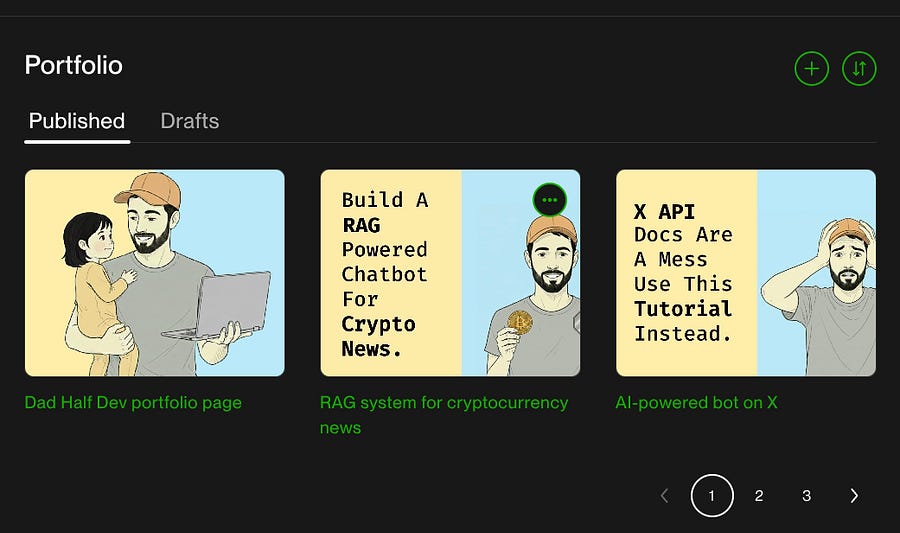
In addition to the portfolio section, you can also ask for testimonials, add certificates, create multiple profiles, and add a video:
I created an introduction video on my profile, but it definitely needs improvement:
Sometimes it’s better to pay someone to help you structure a strong video and an overall solid profile page than to keep spending Connects without a profile that actually catches clients’ attention.
Remember, no matter how many Connects you use, they only do one thing: make you seen. But if what clients see is weak, you’ve just used those Connects in vain.
Use External Sources to Find Clients
If you’ve tried everything else and you are still burning all your money on Connects, the best alternative is to find clients on other platforms and bring them to Upwork.
If you have an Upwork membership plan, you can create Direct Contracts and pay a 0% fee, whereas normally you pay up to a 15% fee.
This is probably the best feature of the membership plan, and it’s really worth it if you’re able to bring clients to the platform.
As for external sources, I mean social media networks, YouTube, Medium, or even people in your city.
In my field, the best social media platforms are X (formerly Twitter) and LinkedIn.
I often write long posts on LinkedIn and redirect people to book a consultation, or at least to visit my profile.
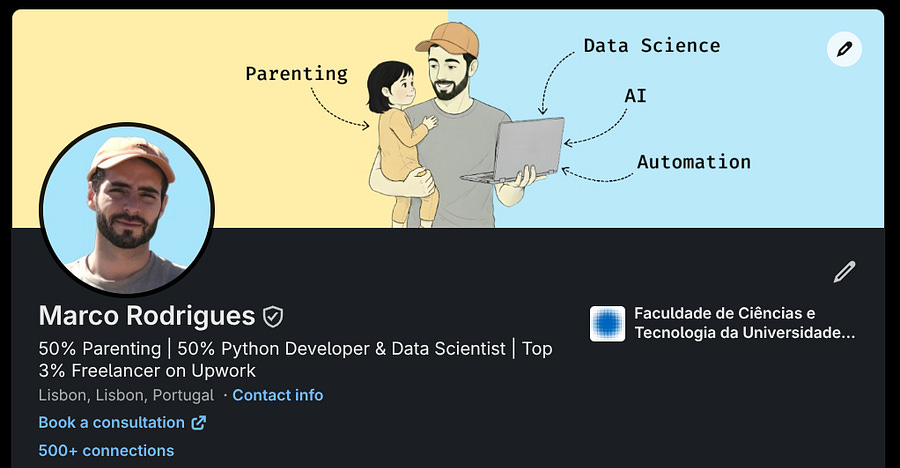
LinkedIn has proven to be the best platform for getting clients, mainly because it is designed to make the match between recruiters and job seekers.
In other words, if Upwork is not able to do it, LinkedIn will handle that part, and Upwork will only be a means for payments and invoices.
Need help with automation, AI, or data science? Let’s talk.
Conclusion
After reading the five strategies in this piece, you should be able to start getting invitations, or at least use your Connects more efficiently.
Picking the right clients will help you thrive on the platform, achieve a higher status faster, and earn good reviews.
Building a strong portfolio ensures that once your profile is seen, clients won’t turn away, and they’ll want to speak with you.
If the platform itself isn’t driving enough traffic to your profile, because you’re not burning enough Connects, try redirecting people from external sources to visit it.
I hope that after this read, you’re not as frustrated with Upwork as I was, because there are ways to bypass the gambling system the platform has created.
Bid less. Feed the algorithm. And show your skills to the world outside Upwork.