


When Grok Bot was first launched, I thought it was too crazy to pay $200/month for something that I was already doing with the Hermes Agent.
Now the price is no longer that, but it still requires a subscription, while the Hermes Agent is free!
In the last few months, I have been running AI agents from Telegram and other chat gateways. They do browser extraction, browser navigation, and many other things that both Grok Bot and the Hermes Agent Bot Mode can do.
In fact, the Hermes Agent Bots aren’t too different from running multiple agents on my Telegram. But they make it easier for non-technical people to set up agents directly on the Hermes Desktop. Besides, you can have the bots talk to each other.
But still, the Bot Mode on the Hermes Agent was never something that I actually needed, so why pay for Grok Bot?
After so many people complained about the premium price to use Grok Bot, xAI decided to give it to Cursor Pro+ subscribers, which was my plan at the time.
I installed it, used it, and now I’m addicted to it…
In this piece, I will tell you a bit about Grok Bot and how it compares with the Hermes Agent Bot Mode. In addition, I will also tell you about five use cases of Grok Bot that are helping me boost my productivity and make money.
Grok Bot vs Hermes Agent Bot Mode: Which one is better?
I must say, I love Hermes Agent, so I’m always very biased toward picking it over other agent harnesses, but this time is different.
The open-source nature of Hermes Agent gives it endless customization options, tools, the freedom to choose between models, and almost everything you can imagine. But it lacks ease of use, especially for people who are not too tech-savvy and just want to start using agents without having to waste time on setup.
The Nous Research team (the creators of Hermes Agent) understood that, and that’s why they have been working on the Hermes Desktop and have lately added the Bot Mode.
Now, creating a Hermes agent (aka profile) is one click, so they definitely did a good job of getting more people to use the harness after this update.
Besides, these are the perks of the Hermes Agent Bot Mode:
Every bot is a Hermes profile, meaning they can run on the Hermes Desktop but also on other gateways, so your agents (bots) can live everywhere.
You can do browser actions on your machine or remote machines, depending on where you have the repository installed.
You can create group chats and have your profiles speak with each other.
You can switch between Large Language Models (LLMs), inference providers, or even use local AI.
You can customize the skills, tools, and SOUL.md of your bots.
The Hermes Agent has built-in browser action tools, but you can also use providers like Browser Use or Browserbase. However, these are not enough when you need to log in, bypass CAPTCHAs, or access Cloudflare-protected websites.
And this is actually the downside of Hermes Agent Bot Mode. You either:
Run browser actions from your computer, knowing that it consumes a lot of RAM, and you may not have enough freedom to work on other things while it runs. You also need to keep your machine turned on all the time.
Run browser actions from a VPS or remote machine, but you need a VNC connection to approve things all the time.
Knowing this, the big win of Grok Bot is exactly this:
It runs on a persistent cloud computer. That is a Linux virtual machine living on xAI’s servers, with its own browser, filesystem, and terminal. When you assign a task, the bot opens a browser on that remote machine.
Like the Hermes Agent Bot Mode, it also allows you to run browser actions from your computer, but you probably won’t need it for most things. xAI’s servers are very fast and store credentials, minimizing the need to constantly approve actions, bypass CAPTCHAs, or log in.
Besides that, Grok Bot also allows you to:
Make the bots interact with each other.
Connect to multiple integrations, like Gmail, Notion, Calendly, HubSpot, and Slack.
Create routines (cron jobs) for repeated tasks.
Create templates for your bots or use existing ones.
What you don’t get with Grok Bot:
Privacy: You’re giving up a lot of privacy with Grok Bot, as your data and activity are handled by xAI.
Customization: Grok Bot doesn’t offer anywhere near the same level of customization as Hermes Agent. You can’t even choose which model to run.
Flexibility: Your Grok bots are tied to the platform. You can’t take them with you and run them on other gateways.

With that being said, the big win of Grok Bot is really the ease of use and speed, because everything else can be done with the Hermes Agent. The browser actions part is the real deal for me. I wouldn’t use Grok Bot for things where an API is enough.
Therefore, let me now tell you about some of the use cases I have been using it for, and why Grok Bot changed my life.
Grok Bot for finding and messaging leads on Upwork
I work as a freelancer, and I use Upwork a lot to find clients. Besides that, I recently created an agency on the platform called tuik, so I also need to apply for jobs on behalf of the freelancers working in my agency.
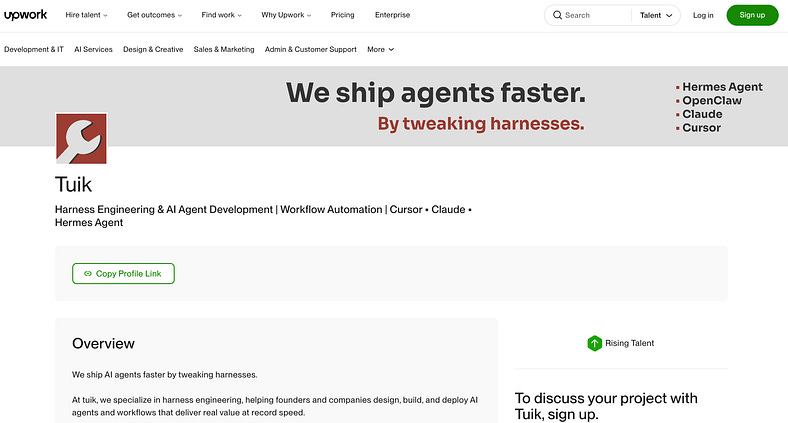
Applying for jobs is time-consuming and frustrating. I used to do it a lot in the early days, but now I mostly get invitations. However, since the agency is new, I need to start doing it again.
The good part is that I no longer need to do it manually. I created a Grok Bot agent specifically for this. It does the following every single day:
Searches for positions that my team and I can deliver: Agent development, AI influencers, workflows, automation, Hermes Agent, Cursor, Claude, and chat assistants.
Applies filters: Only positions that pay above $45/h and accept agencies.
Lists & drafts: I get the top 10 every day, and the agent matches each position with the freelancers on my team, writing a draft as if they were the ones applying.
Sends proposals: It checks how many Connects (Upwork’s currency) my agency has and whether it’s worth bidding or not. Finally, it applies for the position.
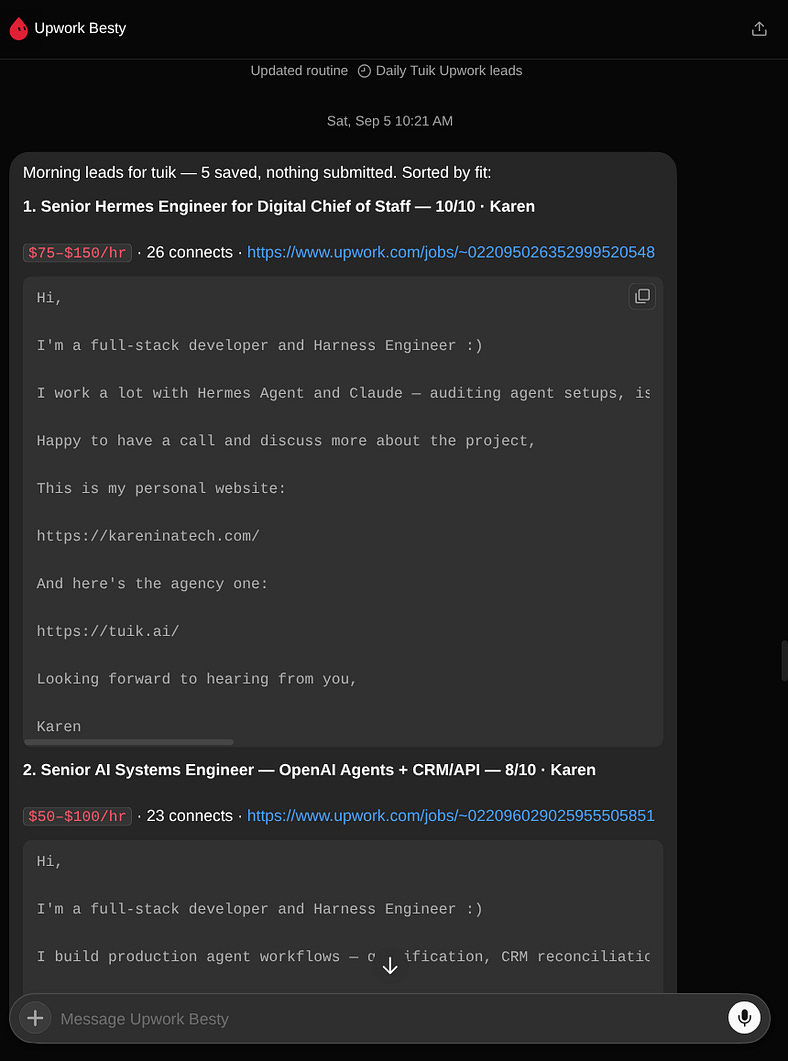
Step 4 isn’t triggered automatically because the drafts are usually not great and look very much like AI slop, which is the last thing a potential client wants to see. So I usually take a few minutes to optimize the drafts, but that’s the only manual step I need to do.
You can argue that Upwork does have a developer API, but so far I haven’t been fortunate enough to get access to it, so Grok Bot has been very helpful!
Grok Bot to collect data from Facebook Marketplaces
I’m from Portugal, and people still use Facebook a lot, especially when it comes to real estate and second-hand products.
We do have our own real estate and second-hand websites, but not everything is listed there, and most likely not at the best prices.
I know this applies to many countries, not just mine. Unfortunately, Meta does not have a publicly available API for individual developers, small businesses, or general public use.
Also, scraping Facebook is extremely hard and tedious.
But Grok Bot changes that. You can literally have the agent collecting data while you‘re away from your computer, using xAI’s remote servers to do the work for you.
The things you can do with Facebook Marketplace are endless, but here are some examples:
Web scraping: You can collect data that isn’t available on traditional e-commerce websites.
Data enrichment: You can find products that are already listed on marketplaces and enrich them with additional information from Facebook. For example, you might find a house on Idealista and then find the same house on Facebook. You can combine the data from both sources to get more insights about the property.
New marketplaces: For instance, there might not be websites dedicated to container houses, but Facebook is full of listings for them. You could create your own marketplace using listings collected from Facebook.
Newsletter: Using the same container house example, you may not want to run a company and deal with managing a marketplace website. Instead, you could simply create a newsletter with new listings every day or week and have people subscribe to it.
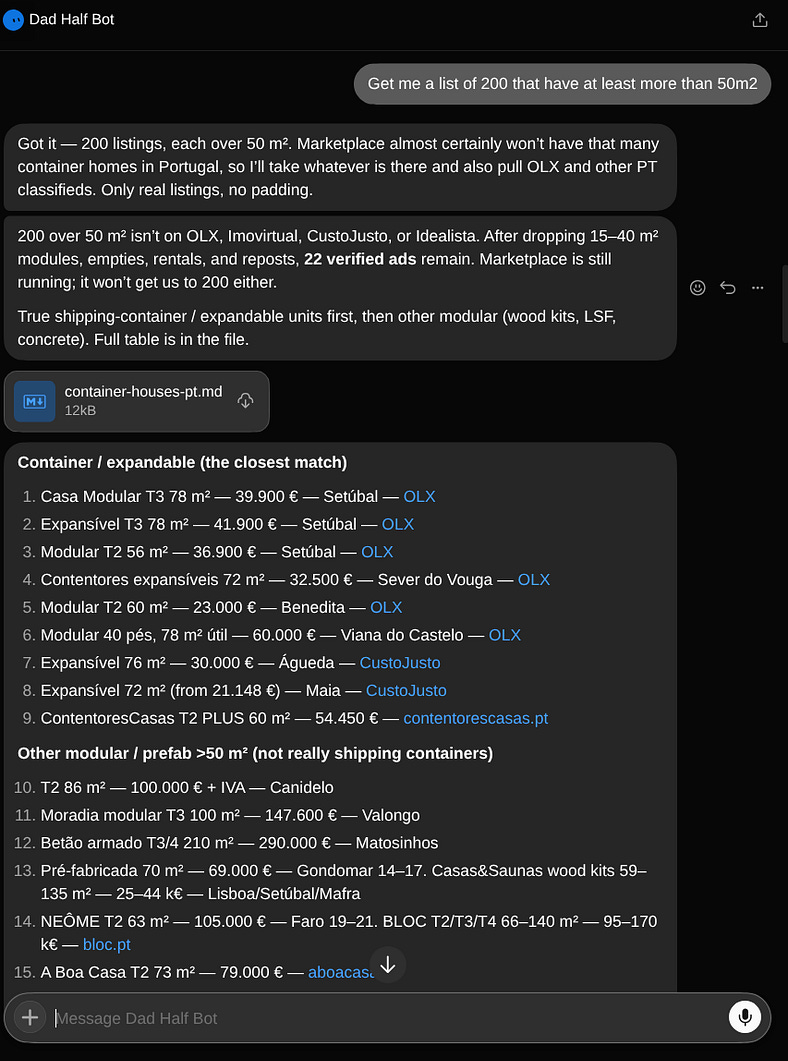
Basically, Grok Bot removes the barrier to collecting data from Facebook and other social media platforms.
Yes, it’s not super fast because it relies on browser automation, and you can’t run it at full speed without risking your account. But it’s good enough for extracting information from niche markets and finding products or listings that you wouldn’t be able to crawl otherwise.
Grok Bot for automated QA
One of the things we do at tuik (the agency I mentioned before) is to build agents. Whether they run on Slack, WhatsApp, Telegram, or even custom chat interfaces that we build ourselves.
The problem is that every time we ship an agent, we need to test it extensively to make sure it is properly sandboxed.
With Grok Bot, we can make this testing process much faster by providing it with a prompt containing detailed information about what needs to be tested.
Currently, we have two chat assistants in production, and Grok Bot runs daily to check them for vulnerabilities. When it finds one, it opens a ticket directly on the relevant platform or sends us a text message.
This implementation dramatically reduces the time we spend on testing, and our customers are also happier knowing that they can reduce costs and ship their agents faster.
Again, Grok Bot is not a full replacement for QA testing, because there are still many things that only humans have the sensitivity to detect. But it does reduce a significant amount of repetitive work.
Grok Bot for funneling information
One of the hardest things about being a freelancer is having to adapt to all sorts of environments and tech stacks that clients use.
For project management, some may use Asana, while others use Notion or ClickUp.
For communication, some use Microsoft Teams, while others use Slack.
For taking meeting notes, some use Google Meet, while others use Fireflies.
For Git, some use GitHub, while others use GitLab.
The list goes on and on, and I always need to adapt to whatever tools my clients use. This usually takes a significant amount of time, especially when I’m working with multiple clients at the same time.
But Grok Bot eliminates a big part of this problem. I can have my tabs of Asana tasks, Fireflies transcripts, and conversations on Teams open, and get the agent to access them, collect all the relevant information, and condense it into the tasks and information I actually need in Notion or any other project management tool.
I think AI is great at information retrieval nowadays, and most of the time, it’s pretty accurate. I can’t say the same about delivering information. AI-generated docs and articles are still often difficult to read and understand.
That’s why using Grok Bot to funnel information from multiple clients’ platforms has helped me a lot. Instead of spending so much time researching, switching between tools, and trying to piece everything together, I can focus on delivering.
Grok Bot for automating my accounting
Getting back to the agency on Upwork. Since I now have freelancers working with me, and I’m the one responsible for paying them, I also need to deal with some accounting and executive-assistant work.
Therefore, I started using Grok Bot to pull the invoices and the hours they worked and generate a report showing how much I’m supposed to pay each freelancer, in whatever currency they use.
This is something that would otherwise take me at least an hour, depending on how many freelancers I have. I need to calculate the hours, apply the Upwork commission, then my commission, check the currency exchange rate, and finally write them a report explaining what I’m paying and why.
This is work I had never done in the past, and thankfully, I don’t need to hire someone to do it. Grok Bot does it on my behalf, and pretty well.
But the accounting process doesn’t end there. I then need to submit the invoices on the Portuguese finance website, which is another step that used to take me a significant amount of time.
Grok Bot now handles this pretty well too, using the PDFs sitting on Upwork that contain all the information from the clients.
Need help with Grok Bot or the Hermes Agent? Let’s talk!
Conclusion
As you may have realized, most of the use cases I used Grok Bot for are related to browser automation. And that’s where I see the real potential of these agents that offer very little customization.
They’re not designed to be highly customizable agents. You don’t get the same control over the models, tools, or workflows that you get with something like Hermes Agent.
This is a good example of how you don’t need very robust agents to improve your productivity, optimize things, or even make money.
Grok Bot won me over because of its browser interaction capabilities and, more specifically, the remote machine provided by xAI. That’s what makes it different from other agent harnesses and has made it possible for me to focus on more important things and spend less time doing repetitive work.
You should still use Hermes Agent for other kinds of use cases and whenever you want more control over your agents, especially when you’re creating and posting rather than just reading and collecting information.
Grok Bot is also cheaper now than when it was first released, so if you’re already paying someone or paying for software to do some of the things I’ve mentioned in this piece, it might be worth giving it a try instead.
But remember that you’re probably exposing a lot of information to xAI. If that’s not a concern for you, then go ahead and automate your life to the fullest.